Wednesday, 2 November 2016

12 Great Landing Page Examples You'll Want to Copy

Landing Page Examples.png

Landing pages exist to serve one purpose: getting website visitors to convert to the next stage in the buying journey. Although their purpose is simple enough in theory, actually designing a successful landing page requires some detailed planning and creative testing.

Regardless of what your business is selling or the conversion action you hope to instigate, it's helpful to get inspired by seeing what other great landing pages look like. And because there's no one "right" way of doing a landing page, you'll want to check out examples from lots of different industries for different stages of the buying process.

Want to get inspired? Check out the great landing page examples below. Build and promote landing pages that generate more leads with the help of this free optimization guide.

Disclaimer: I don't have access to the analytics for each of these landing pages, so I can't tell you specifically how well they convert visitors, contacts, leads, and customers. But many of them do follow best practices while also implementing a few new experiments that could give you ideas for your own landing pages. 

12 Great Examples of Landing Page Design

1) Lyft

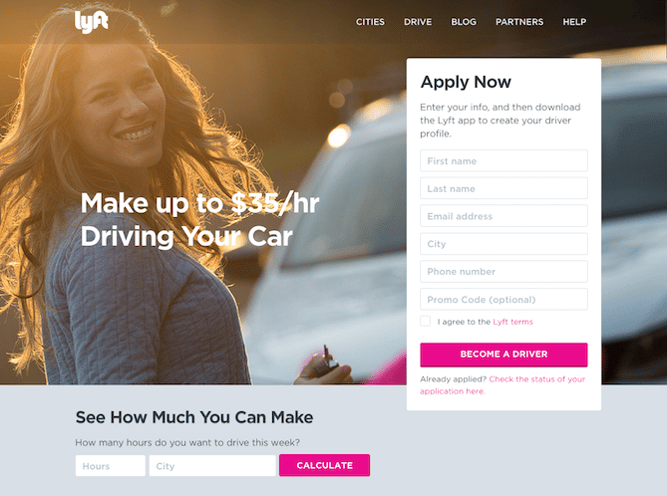
We love that on Lyft's landing page, they zero in on their drivers' main motivation: earning money easily.

We also love that, in addition to the "Apply Now" form, drivers can type their city and the number of hours they might drive for Lyft in a week to calculate how much they'd make. When visitors fill out that information and press "Calculate," they aren't taken to a new page. Instead, they see a dollar amount followed by a new call-to-action button to "Apply Now" (which, once clicked, takes drivers up to the form).

By offering these two conversion paths, they're able to address two different types of people in the conversion path: those who are ready to make the decision now and those who need a little more information before they convert.
lyft-landing-page.png

2) The Professional Wingman

Okay, so the whole idea of having a professional wingman to help you find dates and a meaningful relationship is already pretty cool. But when you're faced with the prospect of hiring one, it also raises questions. How does it work? How much does it cost? Is this really going to help me?

That's why we love this landing page for Thomas Edwards, the original Professional Wingman himself, which outlines exactly what a complimentary coaching session is going to achieve. Plus, it's clear that it's complimentary, thanks to the boldly-colored call-to-action button above the fold.

Once you click that button, you aren't taken to a new page. Instead, an interstitial form appears right there. And while it does request a lot of information -- some of it a bit personal -- it also sends the message that The Professional Wingman is going to take this seriously, but only if you do, too.

Professional Wingman 1

3) Muck Rack

This landing page design has it all. It's visually appealing and interactive, offers scannable yet descriptive headers about Muck Rack's services, and uses quotes from industry professionals as social proof. Plus, the page is intuitive and easy to navigate.

The cool part about this landing page is that it can appeal to both of Muck Rack's audiences. The top of the page is split into two, featuring their two different services side by side. Once a visitor moves his or her mouse over either of the "find journalists" or the "build free portfolio" CTAs, a very simple form appears -- and that's important, so as not to distract the user from the task at hand.

muck-rack-landing-page.png

4) Cigital

There are a few things that make this Cigital landing page work. It has simple and relevant imagery. The headline is straightforward and the description of the ebook informs viewers of the specific value they will get by downloading it. There is only one call-to-action -- "READ THE EBOOK" -- that stands out on the page thanks to a bright yellow CTA button.

The only thing we'd change about this landing page is that we'd remove the navigation bar at the top. They tend to distract visitors and lead them away from the intended action. Not only is this a landing page design best practice, but we've also conducted A/B tests that've shown removing navigation links from landing pages increases conversion rates.

Cigital Landing Page

5) Khan Academy

The hard part about using your homepage as a landing page is that you have to cater to several different types of audiences. But Khan Academy's homepage does that very well. This page is clearly designed for three different types of visitors: those who want to learn something, those who want to teach, and parents who are interested in using Khan Academy for their kids. Plus, how motivational is the emblazoned "You can learn anything" text at the top? 

The remainder of the page is designed for viewers who are not completely familiar with Khan Academy. It colorfully and largely spells out the key benefits of using the learning platform -- all of which are easy to scan and understand. There's also a recurring CTA: "Start learning now." As soon as viewers feel they have enough information, they can click the CTA to get taken back up to the form at the top of the page without having to scroll.

Khan Academy Landing Page

6) Club W

A little bit of delightful copy can go a long way on your landing page. We love the playful little aside -- "(Hint: It's Wine)" -- that Club W included below the header of their corporate gifting landing page. It humanizes the brand and makes them likable, which could have a positive impact on their conversion rate.

The images below that header make a nice use of negative space, showing the user exactly what his or her gift recipient might actually receive, should they choose to gift with Club W. And, of course, there's that bold call to action -- "Email Us".

The one thing we'd change? The CTA prompts the users email software to open, which drives traffic away from the site and the browser entirely. A form might be more effective here -- not only would Club W be able to dictate what information it wants to capture, but also, it would keep the user on-site.

Club W landing page

7) Codecademy

I like this page because it's simple in both copy and design. The image above the fold is a computer screen displaying an HTML bracket with a blinking cursor -- a whimsical, clear visual to accompany the form on the right.

The form itself is simple and only requires an email address, username, password, and a validation that you're not a robot to create an account. Or, you can just use your Facebook or Google Plus login, shortening the conversion path even further.

For visitors who need more information before creating an account, the landing page also offers a video below the fold that explains their concept and value by way of a real-life success story. Again, this helps make the potentially intimidating world of coding more approachable for beginners.

Those who need even more convincing can continue scrolling for additional testimonials and other forms of social proof.

codecademy-landing-page.png

8) Poached

I don't think we've ever lived in a time when, culturally, we've been so food-obsessed. Poached has turned that into a B2B model with a platform to connect proprietors and culinary talent.

When you visit the homepage, there's no mystery about what you're there to do -- the giant "Post a job" and "Choose a city" calls to action help with that. And once you click on one of them, you're taken to a no-frills form to become a member or log in, or a list of jobs in each city. It's colorful and comprehensive -- and, it makes us hungry.

Poached  

9) Breather

Here's another example of clever, delightful design on a landing page. As soon as you visit Breather.com, there's an instant call to action: indicate where you want to find a space. Plus, it uses location services to figure out where you are, providing instant options nearby.

We love how Breather used simple, to-the-point copy to let the visitor know what the company does, followed immediately by the CTA to select a city. And if you need to scroll down for more information, you can see that Breather played with the microcopy with personality ("no commitment, ever"), reminding us there are real humans behind the design. That brings us a little closer to the brand. The negative space and soothing color scheme are also aligned with the product -- essentially, room to breathe.

Breather landing page

10) Startup Institute

Visitors to your website won't hand over their personal information without knowing what they're going to get in return. On its landing page, Startup Institute makes abundantly clear what will happen after you apply by listing a Q&A right beside the form. It might prompt some people to say, "They read my mind!"

To avoid hesitancy to fill out a form, use your landing page to set expectations upfront. That clears the air, and can also weed out the people who don't take your content, product or service seriously.

Startup Institute landing page

11) Edupath

Who is your landing page's target audience? While most of Edupath's website content is directed toward students, there are sections dedicated to advising parents on helping their teenagers through college applications and SAT preparation. The landing page below is in one of these sections.

When parents fill out their teenager's name, email address, and mobile number, a link to download the Edupath app is sent directly to them. The folks at Edupath know students are likely to do something if their parents ask them to -- especially if it means they don't have to surrender their phones.

Plus, it's an easy, one-click process. This whole conversion path is a clever and helpful way to get the apps on more students' phones by way of their parents.

edupath landing page

12) Taster's Club

If there's anything we enjoy more than a fine whiskey, it's a whiskey club homepage that makes it easy to either join or learn more about membership. Case in point: Taster's Club, which immediately serves up those very two CTAs on its landing page -- which also happens to be its homepage.

For those to wish to learn more, clicking that CTA will immediately scroll the user down to colorful, image-rich details on what a Taster's Club membership includes. Keep scrolling, and you get user testimonials.

But clicking the "Join Now" button is where the real fun begins. After doing that, you get to pick your poison -- that is, the type of whiskey you like the most -- and view the membership or gifting options available for it. Once you make your selections, you're taken to an easy-to-navigate checkout page to enter your payment information. Good design and ease of use? We'll drink to that. 

Taster's Club landing page

Want more landing page design inspiration?  Check out some of our favorite HubSpot landing page examples .

Editor's Note: This post was originally published in July 2014 and has been updated for freshness, accuracy, and comprehensiveness.

how to design landing pages that convert


from HubSpot Marketing Blog http://blog.hubspot.com/marketing/fantastic-landing-page-examples
Via http://blog.hubspot.com/marketing/fantastic-landing-page-examples


7 Tried-and-True Strategies SaaS Businesses Are Using to Grow

SaaS Growth Guide.jpg

Back in 2011, Marc Andreessen announced in a seminal WSJ essay that "software is eating the world." Five years later, his thesis was right -- software as a service (SaaS) companies have and will continue to takeover or disrupt large parts of the economy.

This change has been fueled by technology: It's now easier and cheaper than ever before to develop software, and with 3.5 billion people having access to the internet, the potential customer base for SaaS companies is vast. This perfect storm of rapidly lowering barriers to entry, plus access to more customers, has seen software take precedence over hardware.

While technological advances have spurred software development, it’s the subscription model favoured by many SaaS businesses, which has transformed it into a thriving industry. SaaS companies typically charge a subscription for their product, which is delivered and stored within the cloud. The subscription business model means companies reach profitability over time and must continually provide value, otherwise their clients will become at risk of churning.

View our free guide to growing your SaaS company.

Clients often prefer being able to make smaller, monthly payments, while investors like businesses that generate predictable recurring revenue, which makes it easier to forecast and understand the business’ health.

And when it comes to business health, growth is critical to success. That's why we've put together a roundup of strategies SaaS businesses can use to ramp up their lead generation efforts. Need inspiration for your own strategy? Check out the ideas below.  

7 Strategies SaaS Businesses Are Using to Grow

1) Content Marketing

Businesses around the globe are leveraging content marketing to build their brand, attract visitors to their website and generate leads. A key advantage of content marketing is that it has a compounding return, meaning that just like a smart investment, it increases in value over time.

Importantly, content continues to drive leads, whereas other forms of marketing, like pay-per-click (PPC) advertising will only do so for as long as you continue spending. It’s for this reason we think of content as an asset that businesses own, whereas online advertising is rented. This distinction is important for SaaS marketers to consider.

Looking for content marketing inspiration? Here are three SaaS businesses that use content to generate leads:

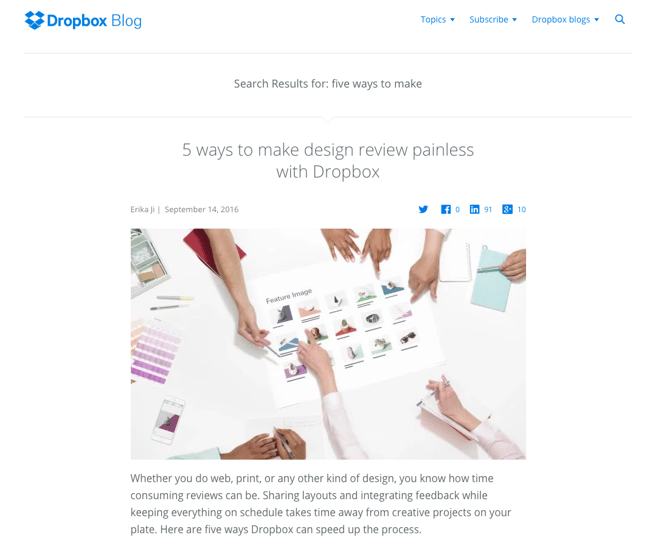
Dropbox

The file sharing and storage service has many types of potential customers and attracts them with targeted content at the Dropbox, Dropbox Business, Dropbox Tech, and Dropbox Developer blogs. They also host a number of webinars to communicate their credentials to prospective clients

Dropbox Blog.png

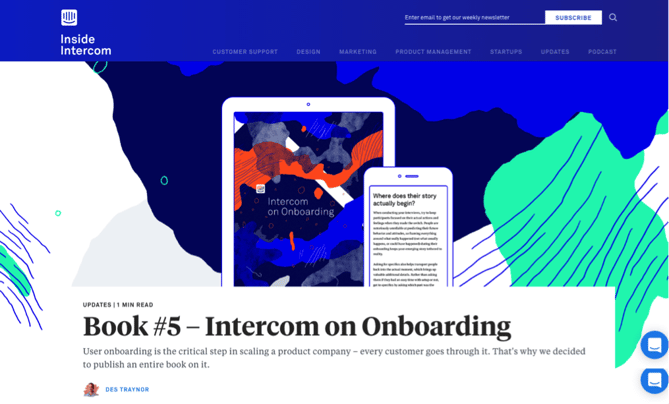
Intercom

Intercom’s content marketing strategy focuses on product management, design, startups, and marketing. The customer communication platform is fast becoming known for the quality of the Inside Intercom blog, podcast, and books, all of which help build their brand and drive qualified leads.

Intercom-1.png

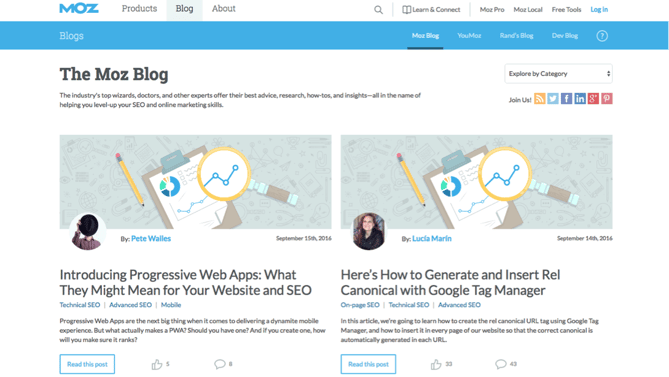
Moz

Moz has developed a reputation for its thought leadership content. They publish a blog post each day, as well as create authoritative guides, and of course, release their Whiteboard Friday videos, all of which generate leads.

Moz Blog.png

While content should be a key part of your strategy it’s important not to overlook content distribution. In short, it’s no use investing in content creation if you neglect distribution. Want to learn more? Check out this post by HubSpot's VP of Marketing, Kieran Flanagan, on why you should spend 50% of your time on distribution.

2) Product Trials

The product trial is fast becoming an important source of lead generation for the SaaS industry. Nothing beats “test driving” a product and your business should consider making a trial available via your website if you don’t already.

Trials are a particularly effective lead generation tool if you’re selling to a tech-savvy audience that want to experience the product, rather than speak with a sales rep. Product trials are typically self-serve, so you can continue to generate leads with little ongoing marketing investment.

However, it’s important to mention a few guardrails. You need to ensure people have a positive experience when trialing your product, so you should consider providing some onboarding or support, depending on the complexity of your product and your unit economics. This could be either through one-to-one calls, group webinars, automated emails, or a combination of all three.

The value of product trials is that they are a strong indicator of buyer intent. A prospect is investing their time getting to get to know your product. At HubSpot, we know that people running a trial have a higher propensity to buy -- we call these folks product qualified leads (PQLs) and we track them very carefully.

The key is to strike a balance between demonstrating value without overwhelming the prospect and doing it in a light-touch and cost effective way. This requires some trial (pun intended) and error, but with ongoing optimisation, product trials can become a stream of highly qualified leads.

3) Search Engine Optimisation (SEO)

SEO works hand in glove with content marketing by making your content discoverable on search engines like Google, Bing, Yandex, and Baidu. You should think of SEO in two separate, yet complementary categories: on-page SEO and off-page SEO. 

On-Page SEO

The good news about on-page SEO is that it’s entirely within your control. You need to create content that people want to read, link to, and share, but there’s also other factors to consider. These include keyword strategy, internal linking, use of titles and descriptions, as well as page load time and UI. For a detailed look at what makes a well optimised website, check out this on-page SEO guide.

Off-Page SEO

People frequently think off-page SEO refers solely to link building, but there’s more to it than that. While links are important, it’s the quality of those links that matters. High quality links from trusted and authoritative sites trumps quantity every time. Social media is also important, as shares and links from influential social accounts are another quality indicator.

The best way to gain links and shares is by creating a distribution strategy. HubSpot’s Global Head of SEO & Growth, Matthew Barby, recently gave a talk at SearchLeeds called 'There's more to life than "great content" which explores this in more detail.

4) Referral Marketing

There’s a growing body of research that shows referrals are one of the most effective types of leads. Although referrals are typically low cost and close relatively quickly, there’s a referrals mismatch among sales and marketing, with 56% of sales reps calling referrals “very important’, yet only one-third of businesses having a program in place.

There’s a lot of debate on whether or not companies should incentivise referrals. One school of thought is that you won’t generate many referrals without an incentive, while the opposing view is that if you incent too heavily, you may get low value quality referrals. The best advice is to test which works for your SaaS business and then optimise for that.

Before focusing on optimisation, the most important part is launching your referral program. There’s software available which can power your referral program from start to finish, but at minimum we suggest you create a landing page on your website where people can make referrals. To ensure you get quality referrals explain what makes a good referral. This could the person’s job title, industry, or size of the company they would for. You should also clearly say if, how, and when people will get incentivised.

Marketing teams can make it easy for sales, customer success, and support teams to ask for referrals by drafting templates they can use. The most important part here is making it easy for sales reps to make the ask, and empowering them to do so.

5) Google AdWords

While inbound marketing can greatly reduce your AdWords spend, millions of people still click on search engine ads each day. If you don’t want to miss out on a portion of potential leads you should still continue to invest in PPC, especially with ads becoming more prominent in Google search results.

PPC remains popular for several reasons. It delivers targeted traffic to your website and is highly scalable, meaning you can increase or reduce spend based on the needs of the business on any given day. It also has a lot of inherent predictability -- both in terms of cost and results -- which appeals to CFOs or those that have traditionally controlled marketing budget. 

The best advice is to run a series of tests and see what activity generates the best ROI for your business. There’s a great variation in competition between industries, but the fact remains you can generate significant levels of traffic and leads from PPC if you’re willing to pay for it. HubSpot has launched the Ads Add-On so our customers can run inbound and paid campaigns from within the software.

6) Co-marketing

Many SaaS businesses decide to collaborate by running a co-marketing campaign with other companies that either complement their product offering, or share a similar point of view or approach to business.

There’s no hard and fast rules about co-marketing, but typically the companies involved create a piece of content, such as an ebook, host a webinar, or publish some research. The leads generated and the costs incurred are also shared by the companies participating.

Both companies have the opportunity to leverage each other’s following, and potentially reach a different audience. If both teams are aligned, co-marketing can be very effective. However, it’s important to ensure both teams are in agreement and understand expectations from the start.

By joining forces with other prominent companies you can create a highly desirable piece of content and generate leads. Co-marketing, when executed effectively is a cost effective approach to generate leads, increase the reach of your brand, and demonstrate thought leadership. HubSpot frequently partners with other companies in co-marketing campaigns, such as this example of HubSpot and LinkedIn:

HubSpot and LinkedIn offer.png

7) Retargeting

Regardless of whether your key conversion metric is an ebook download, online purchase, or free trial, the fact remains that most website visitors never take the action you want them to. Using retargeting (also known as remarketing) you can dramatically increase conversions by re-engaging people that left your website.

Retargeting tracks your website visitors and then displays online adverts as they visit other sites around the web. Many ecommerce sites lead the way with retargeting by offering contextual offers to lure back website visitors. Just think of the time you were looking at an item of clothing online, left the website, and then saw adverts (often with a discount) promoting that pair of jeans on your favourite websites or social media. That’s retargeting in action.

Regardless of industry you can (and should) utilise retargeting to turn hard earned website visitors into customers. And most retargeting software now enables marketers to target people beyond website visits. For example, you can launch a campaign based on events -- such as opening an email or attending a webinar -- while some tools let marketers target people with similar characteristics that haven’t visited your website yet.

Retargeting is a valuable tool for marketers as it gives your brand another chance to establish trust, credibility, and familiarity with website visitors. (HubSpot customers: You can leverage retargeting within the HubSpot Marketing Platform by using the AdRoll integration.)

These are tried and tested strategies to help SaaS businesses grow, but as always, we recommend you test, analyse, and optimise them to see what drives the best results for your business.

What lead generation strategies does your SaaS business use? Share your best strategies below.

saas_growth_metrics


from HubSpot Marketing Blog http://blog.hubspot.com/marketing/strategies-saas-businesses-grow
Via http://blog.hubspot.com/marketing/strategies-saas-businesses-grow

Tuesday, 1 November 2016

How to Use Twitter Polls to Engage Your Audience: 13 Examples From Real Brands

Twitter Polls.jpg

It’s been a year since Twitter polls became an option for users to engage, entertain, and survey their social media audience. And just recently we’ve found ourselves asking, “Are there any brands out there that are really using Twitter Polls well?

In the not-so ancient past, Twitter users used to tweet out makeshift polls and use likes, retweets, or replies to get their “results.” It was a way of engaging with followers over timely events, random questions, and product promotions.

Yet, without real-time voting options and results, these makeshift polls weren’t all that valuable. In fact, they were just like any other tweet meant to drive engagement.

Thanks to the introduction of Twitter polls, all that's changed. We'll walk you through how to set up a poll below, and provide some inspiring examples to help you plan one of your own.

How to Create a Twitter Poll

1) Click the 'Compose a Tweet' button in the top right-hand corner of your homepage.

tweet button-2.png

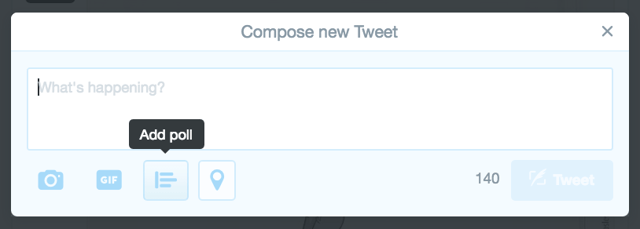
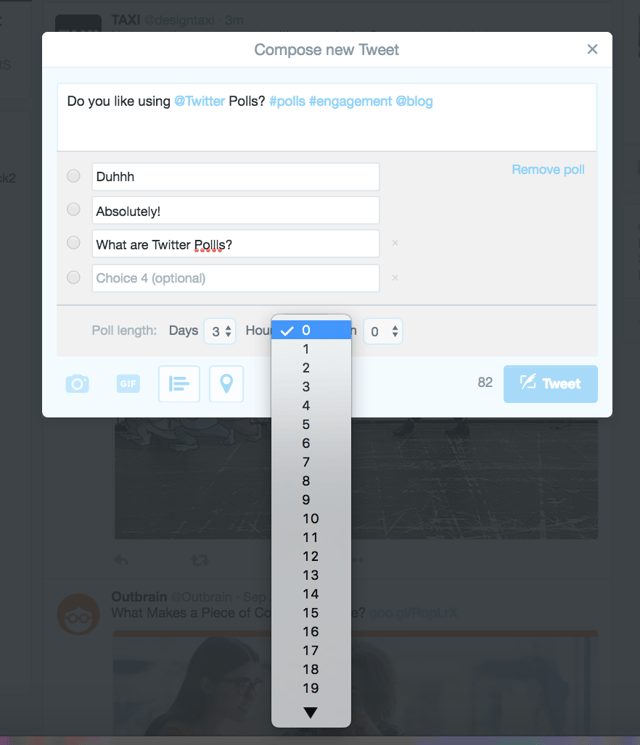
2) Click the “Add Poll” option in the dialogue box that pops up and write copy for your polling question.

compose new tweet.png

Include relevant hashtags, @mentions, and links. Polls are just like any other tweet, just with the added polling feature. Keep it short, clear, and engaging.

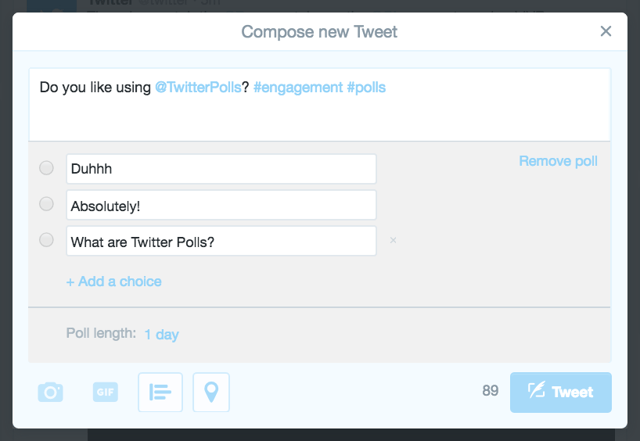
3) Add at least two choices (up to four) on your poll.

add choices.png

Dress your options up with emojis or witty options to show off some personality and catch the attention of folks scrolling by.

4) Set the length of your poll.

time limit.png

5) Click “Tweet” and watch your poll results come in during the set time period.

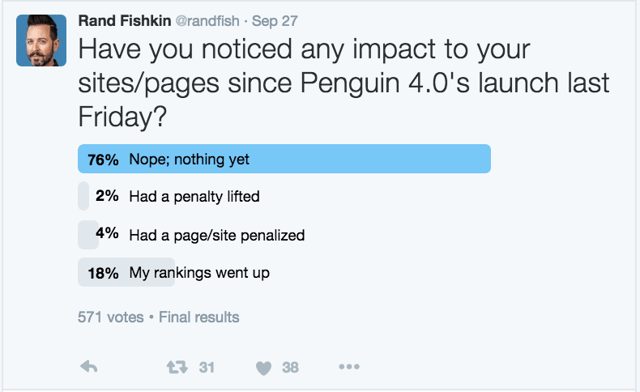
When the time period you set ends, you’ll see a “Final Results” display in the Tweet, like this:

rand-1.png

Couldn’t be easier, right? So now that you know how to actually use Twitter polls, it’s time to dig into how you should use them to engage your audience, gain insights into your follower base, and provide context around your marketing campaigns and efforts.

Luckily, we’ve curated examples from 13 brands to give you ideas for how to use Twitter polls to engage, delight, and entertain your followers.

13 Examples of Clever Twitter Polls From Real Brands

Generate Follower Insights

While Twitter polls aren’t really a reliable way to find sophisticated market data, they can be used to engage your audience by asking for follower insights.

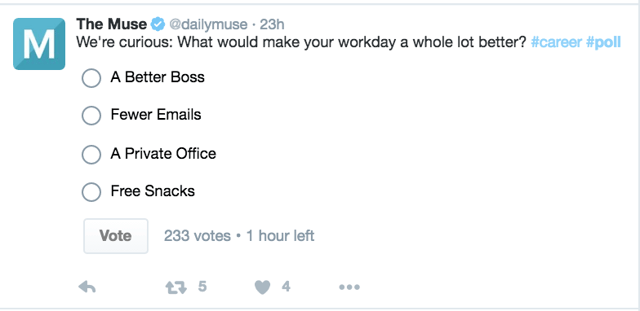
1) The Muse

Muse.png

The Muse is a career advice and job searching site focused on providing job-related content to people looking for it. This particular poll serves as a stand out piece of social content that’s not only relevant to the audience, but also aims to generate engagement through votes, retweets, and likes. What's more, the results of the poll should offer interesting insights to inform future content.

For example, if the #1 answer ends up being “fewer emails," The Muse could write a blog post around helping people clear out their inbox.

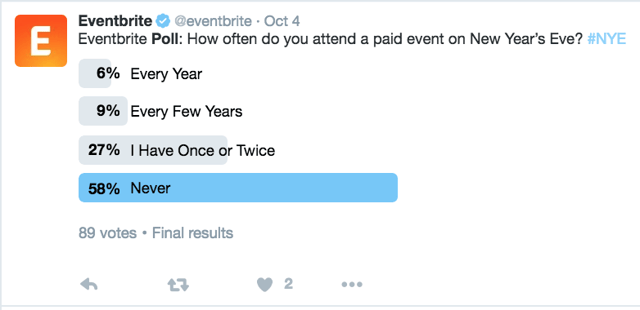
2) Eventbrite

Similarly, Eventbrite's poll also aims to collect follower insights related to holiday seasonal habits.

eventbrite-3.png

Given that Eventbrite posted this poll in October, it’s probable that this poll was in part a strategic tweet aimed at getting its target audience thinking about holiday event planning. Yet, the results can also be used to help frame content or generate new holiday campaign ideas.

Engage Your Followers' Interests

Ideally, your Twitter followers fit your general buyer persona, which means you should have a strong grasp on the content they like to consume, as well as their interests. You probably already use this information to create your social media strategy, so why not tie polls into that strategy, too?

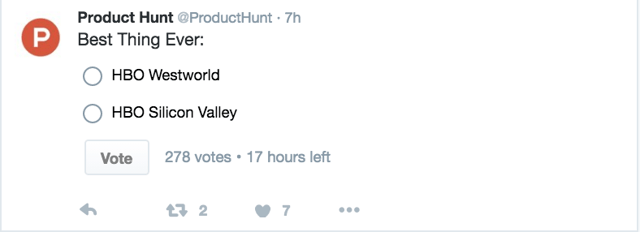
3) Product Hunt

Product Hunt is a content curator that collects and reviews the latest apps, tools, technology, and more. As a hub of tech-information, it curates and posts content for people interested in the tech industry, hence the following tech television-inspired poll:

product hunt.png

While this kind of poll may seem silly and goalless (especially compared to some of your other tweets that may help you drive leads and blog views), it ultimately helps Product Hunt create a positive brand perception and generate audience engagement.

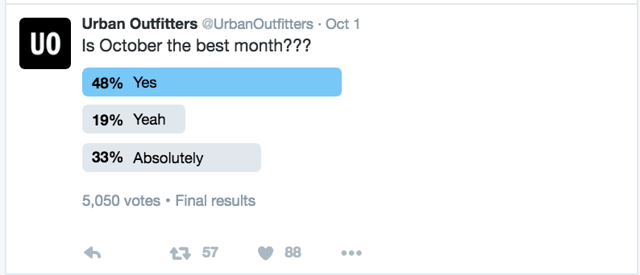
4) Urban Outfitters

Urban Outfitters also played off their audience's interests with this fun, seasonal poll:

urban.png

These types of polls might just be for humorous purposes, but again we can see here how Urban Outfitters might be pairing their tweet messaging with seasonal, autumn promotions. But rather than just Tweet Fall content, they’ve created a Tweet that more effectively encourages engagements.

When thinking up copy for your own Twitter polls, don’t forget to think about timing when it comes to surveying your followers. If you’re tweeting a poll to business professionals at midnight, you’re unlikely to get nearly as much engagement as you might if you were Tweeting the poll during commuting hours. This kind of mindset is helpful when it comes to planning when to schedule your Twitter poll.

Want help choosing the best times to post on social media? Check out this infographic.

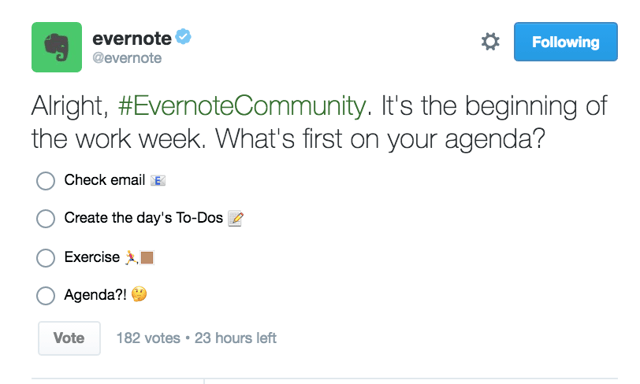
5) Evernote

In this next example, Evernote used timing as a part of its poll by asking what agenda item they tend to tackle first at the very beginning of the week:

evernote-4.png

This tweet is a great example of using timing to engage your audience, but it’s also an example of a way Evernote suddenly encourages users to use its product. If a business professional is scrolling through Twitter and decides to create their to-do list for the week because they see this poll, they might decide to open up Evernote to do just that. It’s a great way to keep your products at the top of your followers’ minds.

Take Advantage of Timely Events

One of the best ways to take advantage of polls is by using timely events -- holidays, sports events, news stories, viral hashtags, and so on -- to engage your audience.

Because Twitter users are already tweeting about these types of events organically, using polls to entertain them or add to the conversation is a strong strategy.

Want to see it in action? Here are a few examples of brands that newsjack events by using polls.

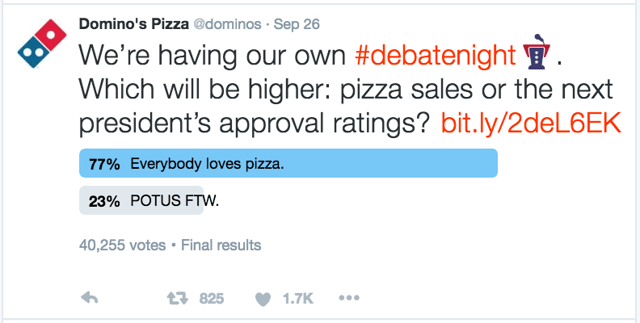
6) Domino's

As you've likely already noticed, there has been no shortage of political tweets being exchanged lately. During one of the presidential debates, Domino's decided to tap into the conversation by posting the following poll:

dominos.png

By using a timely event, Domino’s effectively tied the conversation around the debate back to the brand to entertain its followers (and hopefully encouraged a few of those voters to order pizza during the debate).

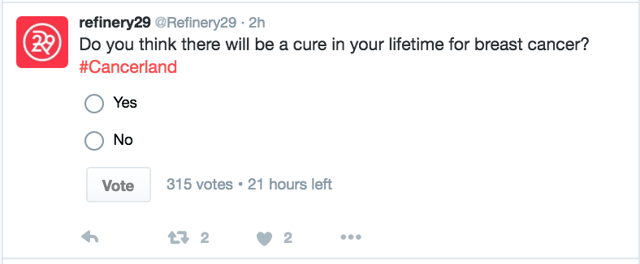
7) Refinery29

Refinery29 -- a women’s news and entertainment media source -- posted the following poll during Breast Cancer Awareness Month to ignite a conversation amongst its followers:

refinery.png

This kind of poll is great because it’s relevant to the brand, sparks interesting conversation, and engages with the overall Breast Cancer Awareness Month conversation.

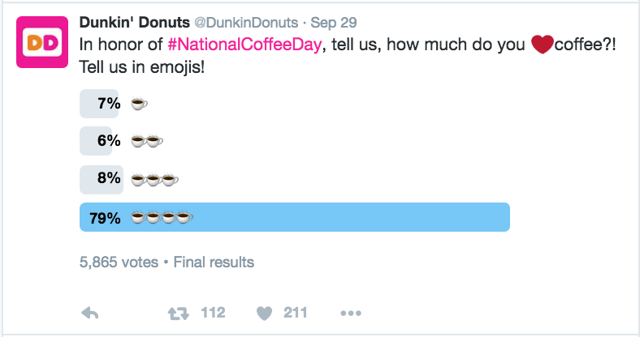
8) Dunkin Donuts

Another great strategy? Pay attention to timely events that are relevant to your brand. Check out how Dunkin Donuts used a holiday-inspired poll to engage its audience on #NationalCoffeeDay:

dunkin donuts.png

Pretty clever, wouldn't you agree?

Encourage Predictions

Using timely events is one way to generate engagement, but you can also ask for relevant predictions through polls based on those timely events. Think about sports events or any other competition that might be relevant to your brand. Are your followers and target audience engaged and watching to see who wins something? Is it relevant for your brand? Use polls to ask for predictions and drive engagement before and after the event.

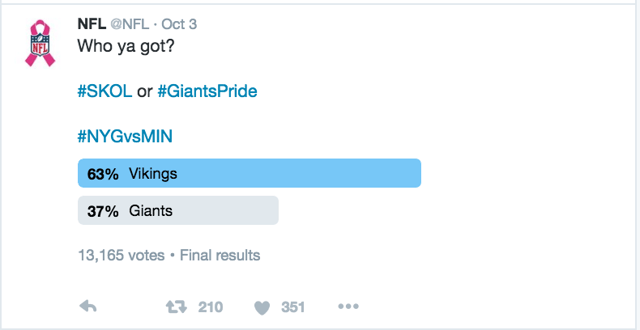
9) NFL

In this example, the NFL asked users for their predictions on who would win the game between the Minnesota Vikings and the New York Giants:

NFL.png

Considering the National Football League was asking for predictions on a professional football game, it makes sense why this prediction is relevant to their brand.

The lesson? Look for ways to poll for predictions that make sense for your brand, and always keep in mind the goal of engaging your audience based on what they’re interested in.

Let People Choose Products, Features, etc.

Twitter polls offer a great way to drive engagement and buzz around an upcoming product or offer launch by giving your followers a choice in the matter.

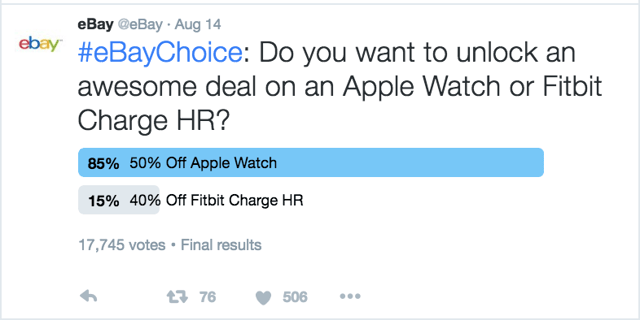
10) eBay

Here, eBay asked its followers what they were more excited about: 50% off an Apple Watch deal or 40% off Fitbit Charge HR:

ebay.png

Keep this poll idea in mind the next time you launch a new product, event, deal, offer, etc. By letting your followers have a say in your launches, you’ll get them more excited and bring generate positive associations toward your brand.

Promote Offers, Live Events, etc.

Here's another helpful idea: You can also use polls to set context for your marketing campaigns, content, and offers.

11) HubSpot Academy

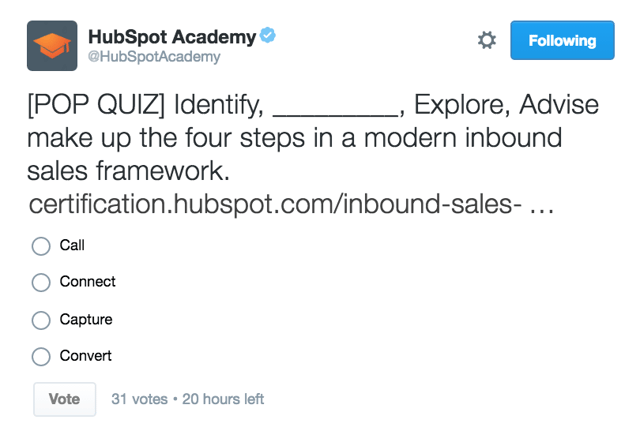
In this example, HubSpot Academy used a pop quiz-style poll to set context for the Inbound Sales Certification:

hubspot academy.png

Whether you’re promoting a blog post, an ebook, or some other offer, try asking engaging questions that set the user up to click the link and find the answer.

Aim for Delightful Brand Relevancy

Believe it or not, using polls to delight your audience with branded questions goes a long way when it comes to entertaining and engaging your audience.

12) COVERGIRL

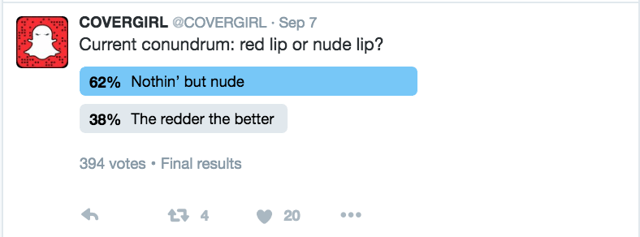
COVERGIRL -- a makeup and beauty brand -- used this clever poll to get its audience thinking about its products:

covergirl.png

When trying to delight your audience, don't be afraid to have fun with it. As shown by COVERGIRL, not every tweet needs to be about generating leads or page visits -- in some cases, polls are simply a great way to encourage brand awareness.

13) Cheesecake Factory

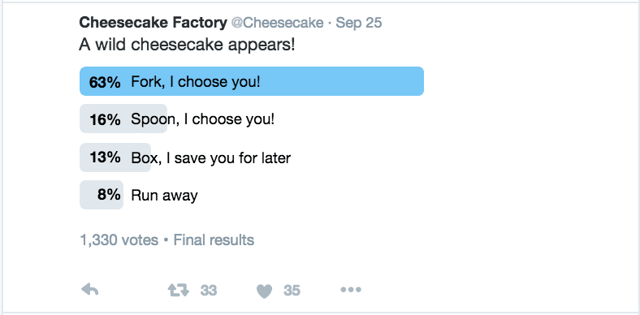
Here’s another great example of a brand-relevant poll by Cheesecake Factory:

cheesecake factory.png

Simple, yet delightful polls (like this one) are a great way to create positive brand perception and awareness. And the more fun and engaging the poll is, the more opportunity to have to effectively expand your audience reach on Twitter.

Best Practices for Creating Twitter Polls

You now know how to use Twitter polls in practice, and you’ve seen some great examples of brands that are using polls to engage and delight their audiences. At this point, it’s time to take this information and create relevant, timely polls for your own audience.

Still need a few last minute tips? Here are some best practices to keep in mind:

  • Don’t be too serious. Twitter polls aren’t meant for mass market research. They’re meant to be fun pieces of engaging social content, so use them as such. Ask questions that your followers want to answer, not just questions you want to know.
  • Use hashtags. Want to use polls as a part of your marketing efforts around an event or launch? Don’t forget to include hashtags and links in your tweet copy.
  • Keep timing in mind. Just like any other social post, you should be posting your polls when followers are going to see it. Check out this blog post on the best time to post on social media -- but don’t forget to dig into the data on when your followers are using Twitter.
  • Set context for your marketing campaigns. Polls are a great way to set context for your other content marketing efforts, events, or product/campaign launches. Ask your audience questions that set context for your campaigns and generate buzz for your content or launches.

What's the best Twitter poll you've ever seen? Share your thoughts in the comments below.

free kit for growing followers on Twitter

from HubSpot Marketing Blog http://blog.hubspot.com/marketing/twitter-polls-brand-examples

Via http://blog.hubspot.com/marketing/twitter-polls-brand-examples

The Right SEM Strategy for Schools

searchbarhand.jpg

Getting your school found online is an ongoing battle that requires different strategies for different goals. Search engine marketing (SEM) is comprised of both search engine optimization (SEO) and pay-per-click (PPC) campaigns. You can use both these strategies to direct traffic to your school's website, blog, or other digital assets you have, e.g. a landing page/microsite promoting a new school program. 

While both strategies can drive traffic, they have different virtues. To maximize your spend and get the best return, you want to use the right strategy for the right reasons.

Where SEO and PPC Differ

SEO is about building a strong content foundation that earns you more attention as time goes on. It's a long-term investment that has a lower cost with slower rate of return. Yet there comes a tipping point at which your SEO-optimized digital assets provide exponential returns. Its value doesn't reside in only a few specific high performing pages — the collective value starts boosting newer content as well. The more authority your site builds over time, that authority applies to other content you post on your site. Your SEO-optimized pages create a perpetual flow of traffic.

Infusing all your digital assets with SEO best practices should be part of your standard practice for every piece of digital content your school publishes.

You can download our full ebook on SEO for schools here >>

In contrast, a PPC campaign is fixed-time campaign that will have high upfront costs, but can get you quick, valuable returns. Your PPC campaign will be designed around a keyword strategy, just like your SEO. Unlike SEO, the PPC campaign only brings in returns for the time you're paying for the ad space. There's no long term benefit or exponential growth. That doesn't mean PPC doesn't have its role to play in getting your school found. It just means you want to pick your spots.

How and When to Use SEO

Really, the answer to "when" is "always." As mentioned earlier, SEO is the foundation that will push your website and blog higher and higher in the search engine results page (SERP). Virtually all searchers click on a first page link in their search results rather than a PPC ad.

Of course, getting ranked for "culinary school" isn't going to be easy (it's a very competitive term). And the truth is, you don't want to. That's far too broad a keyword. Your SEO strategy will return the most relevant visitors to you if work with long tail keywords (LTKs) that are queries containing the language your ideal students use to search for what they want. So if you're a school with a culinary management program that offers an online learning component, you might find "online culinary management degree program" more effective.

The more relevant your long tail keywords are to your personas, the more interested and qualified an audience you'll attract. 

After researching and identifying the most relevant collection of long tail keywords, you need to execute your SEO strategy through on-page and off-page optimization.

On-page SEO

This where you have the most control. On-page SEO uses all the smart ways to embed a page's keyword throughout the page. This doesn't mean repeating the keyword over and over in your text. Those days are long gone. Instead, you'll use the keyword a few times in your text. You'll write naturally as Google also looks for the phrases it expects to see if your program page is truly about an "online culinary management program." So Google might also expect to see other culinary related phrases such "back of the house" or "restaurant operations." 

You also have a variety of tags (i.e. title tags, meta tags, heading tags, and descriptions), where you can use your selected keywords. Some of these tags (e.g. your URL, title tag, and meta description) appear in the search results, so are critical to getting the click. Other tags, (e.g. alt-text tags — used to optimize images), don't always get seen by visitors. But the search engine bots deciding where to rank your page see and use them. Your title tag is probably the most important tag in terms of SEO, but don't overlook any of them.

Google has recently changed a number of its properties for on-page tags, such as giving you more room in titles and descriptions. When these changes happen, it's a good time to give your pages an SEO refresh.

Other on-page tactics to remember are: give the page a quick loading time and incorporate your social sharing buttons so visitors can spread your awesome content.

Off-page SEO

Off-page SEO is when high authority sites link back to your awesome content. You have no control over this, because it requires external sites to like your content and link to it. However, you can encourage this process by sending a lot of social sharing signals in your content.

You want social sharing icons on all your pages, posts, and emails. And you can do more. You can craft copy to encourage people to share by reminding them to do so. You can also create pre-fabbed Tweets and Shares in your content for them to use.

Let's say you have a blog post of interviews with well-known restaurateurs sharing what personal and technical skills they look for when hiring a restaurant manager. Using the "birds of a feather" principle, you might add some copy to above your social sharing icons that says, "Know someone who's wondering if they have what it takes? Help them find out. Share this article." Or "Tweet this:  Graduate as a #Chef from this #Top-Ranked #CulinaryProgram @[YourSchoolTwitterHandle] [url]."

The more your blogs posts and web pages get out there, the more likely people will start to link back to them. 

How and When to Use PPC

While SEO is strategic and on-going, PPC is more tactical. PPC ads are those ads you see at the top of your search results. Since a PPC campaign only runs as long as you're willing to pay for it, you want to reserve for when you have something very specific you want to promote. 

Sticking with our culinary management program example, if this is a new program and you want to drive awareness as well as attract immediate potential students, a PPC program could be a good choice here. 

Another good use case for PPC is to support a specific enrollment priority. Perhaps your school wants to attract students with high musical ability to improve your band and orchestra. Your team has invested a lot of resources creating a report on how music education improves overall learning, which can help students in their future college admissions. You set up a detailed workflow, filled with smart lists and triggered email series to nurture the leads who download this report. Building a PPC campaign around promoting this report could be a valid expense to make this a wide funnel entrance point into your database.

A third place for a PPC campaign may be in growing your funnel numbers for the upcoming year when they're a bit low. If you need a boost in prospects to get the right number of school applicants, a PPC campaign may help. Keep in mind that in this case, you're not looking for people in the attraction stage (top-of-the-funnel). They will more likely already be in their consideration stage (middle-of-the-funnel). So select your promoted keywords and content appropriately.

Use this PPC ad calculator to find out if using a PPC campaign makes economic sense for a specific campaign.

In short: think of SEO as your "always-on" SEM, while PPC is your "special occasion" SEM. You need both, but in the right proportion and places.

SEO DO's and Don'ts for Schools


from HubSpot Marketing Blog http://blog.hubspot.com/marketing/the-right-sem-strategy-for-schools
Via http://blog.hubspot.com/marketing/the-right-sem-strategy-for-schools

How to Run Successful LinkedIn Ads [Free Two-Week Planner]

LinkedIn Sponsored Content.png

LinkedIn is the #1 social media platform for B2B content distribution. That makes it a key platform to generate leads, build professional relationships, and drive leads.

But it’s not enough to use LinkedIn just to build an organic following. If you want to effectively expand your content's reach and get it in front of the right eyes, you should be using LinkedIn's Sponsored Content feature.

Even if you’ve used Sponsored Content before, you may not have mastered all of the steps it takes to make sure you’re getting the most ROI from your campaigns. Luckily, HubSpot teamed up with LinkedIn to bring you How to Run Successful LinkedIn Ads -- a two-week guide on running successful LinkedIn Sponsored Content campaigns.

More specifically, you’ll learn how to:

  • Build an organic audience on LinkedIn.
  • Select the right pieces of content.
  • Identify the best target audience.
  • Build an effective editorial calendar.
  • Implement conversion tracking to prove ROI.
  • Develop an effective targeting and A/B testing strategy.
  • Monitor, report on, and optimize your sponsored content campaigns over time.

Download your copy of How to Run Successful LinkedIn Ads here.

free planner: how to run successful LinkedIn ads


from HubSpot Marketing Blog http://blog.hubspot.com/marketing/how-to-run-successful-linkedin-ads
Via http://blog.hubspot.com/marketing/how-to-run-successful-linkedin-ads

How to Present a Compelling Argument When You're Not Naturally Persuasive

Has this happened to you before? You come up with a great idea for a new project, but when it comes to explaining to your colleagues why it deserves their attention, you just can't seem to generate the necessary excitement or buy-in.

Coming up with a good idea is only half the battle. If you ever want to see your ideas implemented, you need to back up your plan with a stellar argument. As you probably know, this is much easier said than done.

Crafting a compelling argument can seem like an elusive art dominated by the naturally charismatic and extroverted, but it really comes down to a basic awareness and application of what Aristotle called the modes of persuasion.

In the 4th Century BC, the Greek philosopher defined three fundamental types of persuasion techniques:

Ethos refers to arguments grounded in the speaker's credibility, e.g., You are more likely to believe the claim: "This new phone is innovative" if Steve Jobs said it versus if Charlie Sheen said it.

Logos refers to arguments grounded in logic and reason, e.g., "This phone is innovative because it has a battery that was scientifically proven to last 500% longer than any other phone battery on the market."

Pathos refers to arguments that appeal to our emotions, e.g., "This was the last phone Steve Jobs created before his death."

To help you begin developing more engaging, sophisticated arguments, we've taken Aristotle's modes of persuasion and explained how you can best leverage each one. Whether you're pitching a new idea to a client or giving a presentation to your colleagues, these tips will help you take your case up a notch.

Ethos 

Give yourself a credibility audit.

Your reputation really does precede you.

Before you even walk into the conference room, your audience will have preconceived notions about you, and about the presentation they're about to receive. What do they currently know about you? What don't they know? Is there anything about your reputation (or your agency's reputation) that could potentially support your argument? Anything that could potentially hurt it?

The degree to which preconceived notions will influence your actual argument depends heavily on the situation at hand, but it's not a bad idea to think critically about the way you initially come across to your audience. You could present an otherwise flawless argument, but if there are any external credibility issues that aren't addressed, you could be looking at an unswayed audience.

Credibility issues aren't always the massive, obvious problems you'd expect. When I say "credibility issue," you probably think of something dramatic, like a history of pathological lying or ponzi scheming. More often than not, credibility issues come in the form of subtle inconsistencies. For example, if you're trying to sell a client on a new SEO strategy, but your agency's website isn't ranking for a single keyword, then you may have a credibility issue on your hands.

So what should you do if you discover a potential credibility issue? Don't panic. You don't need to directly address every potential controversy (your audience probably doesn't want to hear about the time you accidentally threw a plastic cup in a paper-only recycle bin) -- but you should address the ones that are relevant to your argument.

Going back to my earlier example, you should explain why your agency isn't focusing on SEO right now, but point to some examples of other businesses you've helped with SEO.

It's better to control the conversation around potentially touchy subjects than wait for someone in your audience to bring them up on their own. If that happens, you could be looking at an even bigger credibility issue: They might wonder if you were being willfully ingenuous before, and if you're hiding anything else.

Logos

When it comes to supporting facts, focus on quality over quantity.

More evidence equals a better argument, right? Not quite. While it can be tempting to put together a presentation with 15 statistic-heavy slides worth of supporting evidence, this isn't likely to have a powerful impact on your audience. In fact, overwhelming them with an onslaught of facts and figures will probably make them tune out -- even if your facts are all logically sound and supportive of your main premise.

Just because a fact technically lends support to your claim doesn't mean it will sway your audience. The best evidence needs to not only support your claim, but also have a connection to your audience.

Say you're pitching a digital ads project to a small business, and you mention that 25% of Fortune 500 companies have seen a direct sales increase from using full-page mobile ads. Yes, that statistic shows mobile ads can have an impact on sales, but it doesn't connect back to your audience in a meaningful way. Small businesses and Fortune 500 companies don't approach advertising from the same perspective, so this piece of evidence isn't likely to make a compelling case to your audience.

As a general rule, focus on finding a few relevant pieces of evidence to support your claim, rather than a slew of facts with loose ties to your main point. A small handful of strong facts are more likely to stick with your audience than many loose claims, so choose your supporting evidence selectively, always being mindful of the connection back to your audience. If you can't draw a line back to your audience, toss that piece of evidence out of your argument. 

Pathos

Focus on the story, not just the logic.

When sitting down to develop an argument, most people fall into the logic trap: They put the vast majority of their time and resources into making sure each of their main points is followed by a list of bullet points to back up their claims. When the presentation rolls around, their audience is uninspired, and the speaker is confused: "Why didn't they love my logically-reasoned and perfectly valid arguments?"

Your audience isn't grading your presentation for logical validity. Don't get me wrong, logic and structure are important to the foundation of an argument -- but they can't stand on their own. To craft a truly compelling argument that incites action from your audience, you need to inject a hefty dose of emotion and narrative. Good storytelling is what separates impactful arguments from mediocre ones.

You might be thinking: "But I'm writing a budget proposal -- how am I supposed to make an emotionally-appealing narrative out of that?"

It's actually a lot less complicated that you'd expect. Start by sketching out a simple emotional map of your presentation. How will your audience feel before the presentation even begins?

Maybe you know morale has been low lately at your agency, and the team needs a reason to feel optimistic about the future. Maybe you know that your budget proposal presentation isn't a hotly anticipated meeting, and you need to give your audience something to get excited (or even just mildly amused) about.

Identifying the preexisting mood of your audience will help you figure out what emotions you'll need to incite to keep their attention and pull them into your story. Once you've figured out how they'll feel at the outset, determine how you want them to feel at the end. What emotions will make them more likely to support your argument? What story can you tell to lead them towards these emotional conclusions?

For example, if you're pitching a website redesign project and you know that the client doesn't currently think it will make a difference to their marketing efforts, you'd want to incite excitement and optimism in your presentation.

To do this, you could weave in a narrative that focuses on how the website redesign will lead towards a better future for the client's business. It's not about forcing a narrative onto your facts, it's about finding the story that already exists and running with it. 

Know Your Audience and Setting

So how do you know when to appeal to ethos, pathos, or logos? The key is understanding your audience, and considering what form of appeal is most likely to resonate with them at that particular time and place.

Don't stress about including all three modes of persuasion in every presentation. Feel out your audience beforehand and determine which types of arguments are most likely to appeal to them in the given setting. For example, a budget meeting will definitely call for some strong logical appeals, but adding in an emotional appeal might beef up your claims and result in a more compelling claim. It's all about striking the right balance of appeals for your particular audience and circumstances.

creative-brief-cta


from HubSpot Marketing Blog http://blog.hubspot.com/marketing/compelling-argument-not-naturally-persuasive
Via http://blog.hubspot.com/marketing/compelling-argument-not-naturally-persuasive