Friday, 4 November 2016

The Most Shared Phrases and Topics on LinkedIn [New Q3 Data]

LinkedIn Popular Content.jpg

LinkedIn is best known as the world's largest professional network -- in other words, users aren’t there to look at cat memes or read celebrity gossip. Instead, they're looking to connect with people in their industry, network, keep up with industry news, and look potential job opportunities.

For marketers, paying attention to this difference in user purpose is key when building your social strategy. The more looped in you are on what people are talking about, the easier it becomes to use that information to craft helpful, targeted content. And that's where this data study comes in.

My company, ClearVoice, recently conducted a study that provides data and insight specifically on the most popular posts on LinkedIn. The data was generated by Content Studio -- our comprehensive index of the most popular content and influencers on the web -- and includes insights from the third quarter of 2016. 

Want to build these trends into your LinkedIn strategy? I'll walk you through them below.

Top 20 Most Common Phrases on LinkedIn

Here are the top 20 most common phrases in headlines used on LinkedIn, followed by the number of shares that phrase received in the third quarter of 2016:

  • Successful People: 91,729
  • Right Now: 88,182
  • First Time: 76,578
  • Job Interview: 72,357
  • Best Employees: 70,964
  • Best Reasons: 68,167
  • Employees Quit: 66,773
  • Finally Offering: 61,468
  • Science Says: 53,756
  • Study Finds: 43,810
  • Next Big: 41,740
  • People Want: 47,808
  • Helps One: 31,433
  • Work Helps: 31,433
  • Crazy Hours: 31,319
  • Stop Touting: 31,113
  • Touting Crazy: 31,288
  • Make Better: 31,113
  • Now Available: 31,019
  • Announce Shares: 30,309

How to Put the Data to Work:

To make the most of this insight, you'll want to build a LinkedIn-specific strategy with these popular phrases in mind. To help you navigate that process, check out the following best practices and tips:

  • Use the phrases (naturally) in your titles. According to HubSpot, "How Successful People Stay Calm" by Dr. Travis Bradberry was once one of the most-shared LinkedIn posts of all time, with nearly 2,000 shares. Notice it includes that popular phrase "successful people" in a natural way.
  • Rework existing titles. Your content doesn't have to be new for you to incorporate these findings. Let’s say you want to republish part of your whitepaper, titled “SEO Strategies for 2016,” on LinkedIn. Instead of publishing as is, rework that title to include a popular search phrase -- for example: “New SEO Strategies to Try Right Now."
  • Put quality first. These phrases won't increase shares if you don't have many connections or produce poor content. In fact, there are plenty of articles that use these phrases and still don't perform. To avoid falling into that trap, use these phrases to improve the reach of your high-quality content.

Top 20 Topics Shared on LinkedIn

ClearVoice also looked at the top 20 topics LinkedIn users share most often, which offers a snapshot of the current content-sharing landscape. As these keywords tend to fluctuate in real time based on what's going on in the news and in pop culture, this is an area you will want to check regularly. 

Here are the top 20 topics found in the titles of the most-shared content on LinkedIn:

  • Social Media: 323,535
  • Real Estate: 115,577
  • Big Data: 113,750
  • Internet of Things: 78,418
  • Artificial Intelligence: 71,578
  • Virtual Reality: 71,108
  • Machine Learning: 68,334
  • Content Marketing: 66,951
  • Performance Evaluation: 60,841
  • Data Center: 50,928
  • Customer Experience: 50,267
  • Pokémon Go: 48,670
  • Emotional Intelligence: 46,887
  • Digital Transformation: 46,186
  • Open Source: 43,558
  • Digital Marketing: 42,525
  • 5-hour rule: 40,423

How to Put the Data to Work:

Start by looking at the topics on our list and note which ones are related to your industry. Don't try to create content on topics that do not make sense for your brand.

For example, Pokémon Go was extremely popular with the general population in Q3, and not surprisingly, marketers found ways to use it to their advantage -- this related article managed to garner over 1,000 shares.

Let's look at three other examples that highlight how marketers can put this data to work:

  1. Consider pairing popular topics with news. This post combined a popular topic ("social media") with a recent news story and earned 1,000 likes in just one day. This is particularly impressive when you consider most LinkedIn users don't go to the platform looking for celebrity news updates.
  2. Focus on popular topics that are related to your field. This post (about "machine learning," which is the #7 most popular topic on LinkedIn) earned 259 shares.
  3. Try combining popular topics in your title. Caveat: When it makes sense. This post combined "machine learning" and "big data," related fields which both made the most popular topics list.

How to Pair Phrases From Each List

Pairing the two data sets together will provide you with powerful headlines. For example, “How Successful People Use Social Media” or “Content Marketing Strategies that Work Right Now.”

Here are two examples of posts that used the combined power of the most popular phrases and the most popular topics:

  1. "Want to Make Better Hires? Stop Over-Policing Employee Social Media." In addition to using the popular phrase "make better," the title of this post also includes the popular topic "social media."
  2. "Why should every marketer be excited by Virtual Reality right now." This post is almost a triple whammy, using "marketer," "right now," and "virtual reality." If they had added "digital" in front of "marketer," it would have included one popular phrase and two popular topics. Either way, the double whammy seems to have worked -- this post has received 345 likes and 85 shares in four months.

Ready to Boost Your LinkedIn Content Strategy?

Use this data as a starting point to create fresh, useful content that your LinkedIn audience will want to read and share. And while including these phrases in your headline or writing about these topics doesn't guarantee high shares counts, it will give you a clear advantage, so use the information wisely.

What success have you had with including any of these terms or topics in your content? Let us know in the comments below.

free guide to using linkedin

from HubSpot Marketing Blog http://blog.hubspot.com/marketing/top-phrases-topics-linkedin-data
Via http://blog.hubspot.com/marketing/top-phrases-topics-linkedin-data

How to Conduct Research for an Infographic: A Simple Step-by-Step Guide

infographic-research.jpg

They say a picture is worth 1,000 words. In reality, a picture is worth closer to 84.1 words depending on a variety of other factors, but let’s face it, that’s not as catchy.

The original point of the saying still stands, though: Images communicate information more effectively than text alone, and they’re best when working together.

According to BuzzSumo, articles with an image once every 75-100 words got double the number of social shares as articles with fewer images. More specifically, infographics are shared three times more than other types of content. Save countless hours using these free, pre-made templates to design your infographics.

But before you design an eye-catching infographic, you must first do the research to determine what story you’re going to tell, and how you’re going to tell it visually. And that research stage can be pretty tricky -- especially if you don’t have a plan.

That why we put together a helpful guide that’ll walk you through how to conduct research for an infographic, without driving yourself crazy.

Why Infographics?

There’s a reason infographics are such a popular form of content: Viewers love them. According to a survey by BuzzStream and Fractl, images are the second most popular type of content among viewers of all ages. Furthermore, research shows that website visitors pay attention to information-carrying images more than images that are simply page decoration.

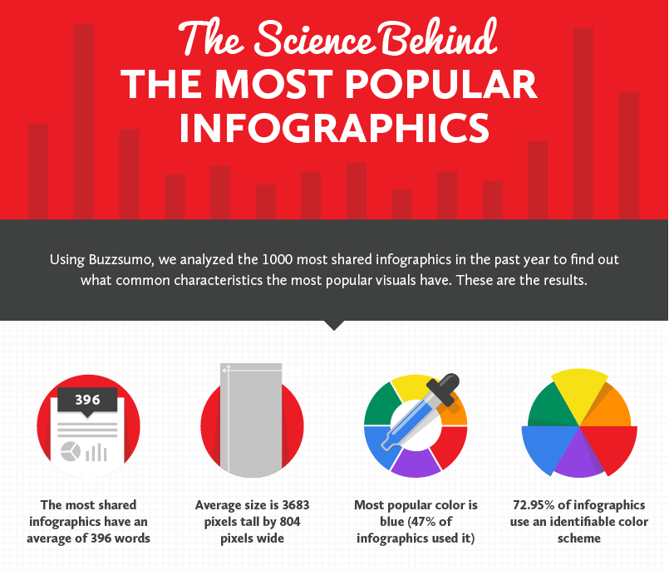
This is clearly a type of content your readers search for, so how do you make an infographic that’s informative, beautiful, and shareable? Siege Media conducted a study on what makes infographics inherently shareable (the results of which they turned into a great infographic of their own), and as it turns out, the most oft-shared infographics had an average of just 396 words. (For a point of reference, you’re almost 300 words into this article.)

That’s some seriously effective storytelling, and if you want to craft a killer story, no matter what the content format, you have to do great research. You might think that all research is created equal, but there are specific tasks to ensure that you tell the right story for a graphical interpretation. Check out our list below for tips on how to begin your infographic design journey with a strong foundation of research.

How to Conduct Research for an Infographic: A Simple Step-by-Step Guide

1) Identify your audience.

Before you start conducting research on your topic, it’s essential to think about the audience who will view it. Market research is important because it makes you think beyond just one piece of content and instead about the impact it will have.

Questions content creators should ask themselves before starting infographic research include:

  1. Who searches for information on this topic? What are their ages, job roles, and demographic traits?
  2. What emotions do you want to evoke with your infographic?
  3. What do you want viewers to do with your infographic once they view it?

Tools:

1) Google Images. Hop into this search tool and check out infographics on similar topics. Then, drop them into the search bar and conduct a reverse Google image search to see what sites link to these graphics. What do they have in common, and what trends can you apply to your research?

2) HubSpot’s Free Buyer Persona Templates. These templates make it easy to keep track of what your audience is motivated by and searching for. Even though you’re not selling the infographic, if you’re using this content to attract potential customers, you’ll want to keep their objectives and motivators in mind.

2) Do your keyword research.

Once you’ve determined who will be searching for your infographic, you’ll want to figure out exactly what they’re searching for. In her article, HubSpot Customer Demand Manager Rachel Sprung wrote about how to conduct keyword research for SEO. Key to this process is starting with broad topics and potential search terms, then working your way to more specific terms using quantitative data.

Tools:

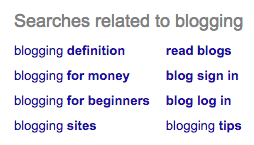
1) Google. At the bottom of a Google search engine results page, a list of related popular search terms appears. Here’s an example of my search for “blogging:” (Remember -- start with broad search terms.)
blogging Google Search.png

Use the related search results to dig into the information your audience searches for so you can better tailor your infographic research.

2) Google Trends. This tool shows you how searches for a specific word or term have evolved over time. If searches for a certain term are increasing, that may be an angle to pursue in a piece of content. Here’s the search history of “blogging” over the past five years:

blogging Explore Google Trends.png

From this result, it’s reasonable to assume that search volume for this term is on a slight decline, and that my research process could benefit from more specific search terms to really pinpoint my audience.

3) Google AdWords Keyword Planner. This tool shows you the search volume of terms compared to similar terms. This is helpful to determine which words or set of several keywords, or long-tail keywords, are the most popular in search. These long-tail keywords will help determine the angle your content should address. Here’s the search volume of “blogging” and related terms:
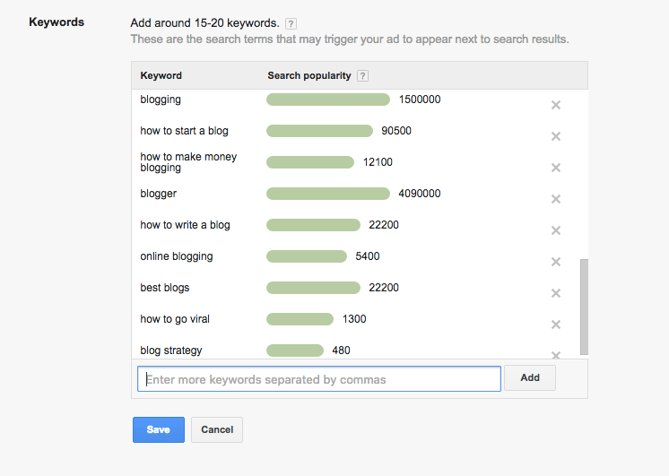
adwords-1.png

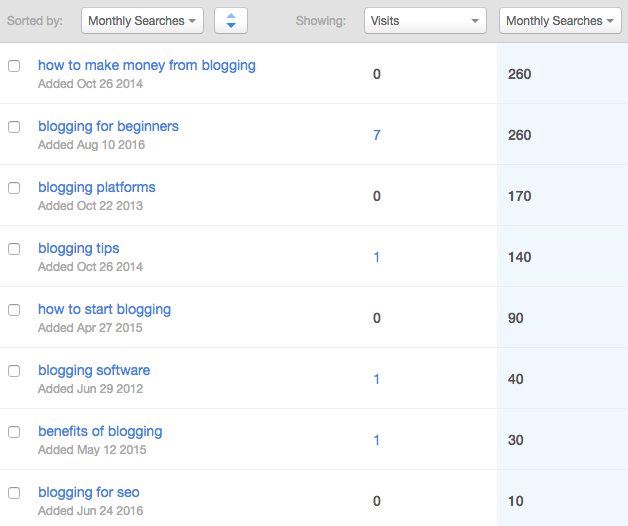
4) HubSpot Keywords App. If you're a HubSpot customer, this handy app has several of the above capabilities already built-in. You can use the tool to conduct general keyword research and narrow your focus when selecting a topic:
Keywords HubSpot.png

In this case, I searched for “blogging” and found that “how to make money from blogging” has a high number of search terms, so I might consider that angle as the topic of my infographic.

3) Keep search terms broad to find lots of data.

Once you start to conduct research on the topic of your infographic, don’t limit your content by what angle you think the infographic should pursue. It’s smart to do general research on a topic so you gain a basic understanding, but be mindful that it can influence the information you’re searching for.

For example, if you decided to focus your infographic on how to make money from blogging and only researched advertising as a means to achieve that goal, the data you pull won’t provide all of the information necessary to create a comprehensive infographic. Research a topic, not a particular story or angle, until you have more concrete data.

Tools:

1) Google Scholar. This resource serves as a great place to start your research. It’s a free search engine of scholarly literature on a variety of different topics and disciplines that will give you an idea of the type of data aggregated on the topics you research.

2) JSTOR. This tool provides a database of primary resources, such as journals, original research, and books. You may need to purchase login access ($19.50/month) or log in through the credentials of an academic institution you’re associated with.

3) Harvard Business Review. HBR is a scholarly magazine that publishes research, case studies, and statistics on a variety of different topics, including business, leadership, strategy, and economics.

4) Pull data from reputable, original, and validated sources.

When you find data during your research process, we recommend the following standards to decide whether or not to use it in your content:

Is it original?

Find the original data source for any statistics you encounter during your research process. Due to the plethora of different blogs and news outlets, many different websites can cite the same statistic without citing its original source. If you find a compelling data point that you want to use in your infographic, trace it to the original research source.

If you can’t find the original source, the statistic is unsubstantiated and shouldn’t be used.

Is it reputable?

Another question to ask yourself when conducting research is where you’re conducting research. Any individual or organization can start a website and publish content, but that doesn’t mean all content on the internet can be taken as fact.

Vertical Measures recommends starting internet research on .gov, .edu, and .org sites, which are associated with governing bodies, educational institutions, and organizations with greater legitimacy than blogs or individuals.

Can it be validated?

Even if you find a statistic on a reputable source, you’re not done yet. Raven Tools recommends that researchers make sure to properly fact-check information they find by a) determining if it’s cited by any other organizations or b) checking the methodology of its original research. If the data point seems unreasonable, trust your instincts and dig deeper.

Tools:

1) Pew Research Center. "From economic conditions, to political attitudes, to social media usage, the Pew Research Center website has a ton of free research that you can use to better understand your target market," noted HubSpot Content Strategy Manager Jami Oetting in her roundup of the best market research tools. Check out the full article for even more related tools.

2) HubSpot Research. Our very own research hub offers free market research data and presentation tools to visualize your data.

5) Use recent data.

You've put time and resources into researching and designing a great infographic. Make sure you cite recent data so other sources will be interested in referencing your graphic once it's published. The folks at Killer Infographics recommend sticking with data that’s 1-2 years old so your graphic will be relevant for months to come.

As a caveat, some original research data that would make a compelling case for your infographic may have set the standard for its industry more than two years ago. For example, I’ve referenced research on the curiosity gap that’s from 1994 in previous posts, as this original study coined the term that’s still used today. The trick here is to find more recent research that re-tests and substantiates the original theory so it’s a legitimate data point, instead of simply dropping an older statistic into your infographic.

Tools:

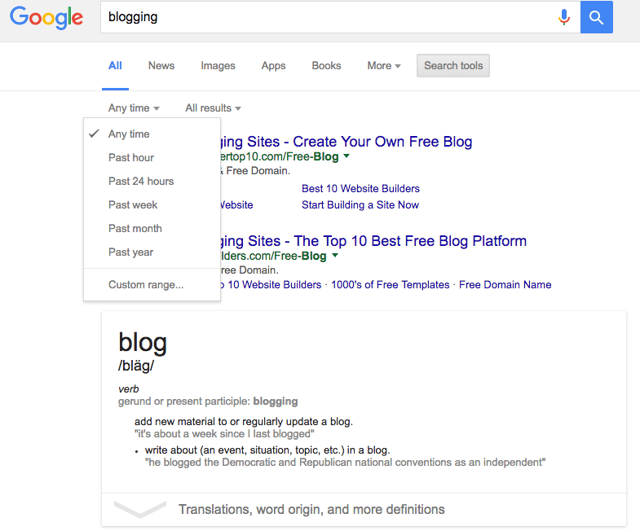
1) Google Advanced Search. This feature allows you to limit search results to a certain timeframe to search for only the most recent info available. If you have trouble, widen the time range slightly. To set this up, enter a search term, select ‘Search Tools’ in the menu bar at the top of the page, and narrow your results by choosing how recently you want the data to have been published.
google advanced search.png

With this feature, you can filter your search engine results according to when articles were published and according to their domains (.gov, .edu, .org, .com), among other features.

6) Hunt for data that can be visualized.

Remember what Siege Media found? The most-shared infographics had an average of just under 400 words. This means that the graphics relied on data visualizations, charts, and illustrations to tell the data’s story. Research for a blog post is different than research for an infographic because visitors expect to read a blog, but they don’t necessarily anticipate close-reading a graphic.

Think about data that can be turned into visuals while you research. Numbers, such as percentages, survey results, and change over time can be easily visualized using graphs and charts. Are there categories within your data that you can visualize using icons or illustrations? Can you turn a multi-step process into a mini-graphic instead of writing it out?

Analyze all of your research findings wearing the hat of an illustrator and ask yourself if there’s a balance between data that can be visualized and data that must be written out.

Tools:

1) Canva. HubSpot Senior Staff Writer Amanda Zantal-Wiener wrote an article about tools to make your own infographics, and Canva made the top of the list. Even if you won't design your infographic yourself, experiment with this design tool (and others on the list) to see how easily your data can, or cannot, be visualized.

7) Use the data you've compiled to craft a story.

When you think you’re done with your research, try to lay out the story that your graphic will tell. You may even want to storyboard your infographic: Write out your data points, and lay them out according to the order they’ll be visualized in the infographic. Does the story make sense? If the story isn’t clear or obvious, then you’re not done researching.

It’s easy to get stuck in the story you think your graphic should tell, but does your research data actually tell the story? Vertical Measures suggests that you let the research drive the topic and narrative of the infographic. If you’re stuck in what you think the data should be saying, you run the risk of citing your research in a way that manipulates the data.

If a data point isn’t self-evident as a visualization, it’s probably not the right data point, or it doesn’t have the right context. Go back and gather more research if you can’t craft a story that makes sense with just the data -- If you have to fill in too much with text, it will make for a visually unappealing and potentially incorrect infographic.

Tools:

1) Trello. This interactive planning and organizing tool lets you create cards that you can move around your board to organize in any way you want. You can storyboard using Trello by creating cards with different statistics on them and rearranging them to create a skeleton for your infographic.

2) Index Cards. Okay, so this one requires you to get a little crafty, but it's actually my personal favorite method. Write out the key facts of your story and start laying them out on your desk to get an idea of your infographic’s flow.

8) Choose a provocative fact to anchor your infographic.

Strong infographics are loaded with interesting data that’s beautifully illustrated. These infographics are shared when they prompt an emotional response.

Content that shocks, disgusts, saddens, delights, or scares people performs well: Researchers Jacopo Staiano and Marco Guerini found that content that prompts feelings of valence, arousal, and dominance tends to go viral. Additionally, in an analysis of photos shared on Reddit, Fractl found that positive emotions were most likely to generate virality, but that content that provoked negative emotions with the right combination of arousal and dominance could be hits as well.

Raven Tools and Killer Infographics suggest finding a data point that gets to the heart of the topic you’re tackling to hook your reader and incite an emotion that will make them share your graphic. Then, use that hook as the infographic’s visual focal point, and build the rest of your story around it.

Check out Siege Media’s meta infographic about what makes infographics popular. They visualize and highlight the most surprising findings first to keep viewers scrolling, and then break down each finding with more research results.
siegemedia.png

Image courtesy of Siege Media

Tools:

1) GoogleTo avoid being repetitive,  “[topic] + infographic” to see what else is out there. Ask yourself: Has this angle already been covered, or would you provide a unique view on the topic?

9) Get feedback.

This may seem obvious, but feedback is a critical step in determining when the research phase is over and when writing and designing your infographic can begin. Before presenting a design proposal to your manager or client, tap your peers for their input. Ask questions like:

  • Do you understand the story’s flow?
  • Is the hook of the infographic interesting?
  • Does this data need further explanation to make sense?

It’s often challenging to remove yourself from a project you’re immersed in to honestly edit it, so feedback during the research phase will identify any weaknesses that may need to be addressed with the help of further fact-finding.

Tools:

1) Google Drive. Teams can provide feedback on documents and images by sharing them on Google Drive and leaving feedback comments.

2) PDF Preview. This tool lets you edit image files and share them with your team for feedback. They can add comments or delete items from the infographic and share their feedback with you by sending PDF or JPEG files back and forth.

Ready to Research?

In most cases, great data is the foundation of a successful infographic, so it’s worth investing time and efforts in finding the most relevant, current, and credible information out there. Key to the process is remaining open to letting the research inform the editorial strategy, instead of the other way around. And once you’re ready to start designing, check out these infographic examples, as well as these free infographic templates, for inspiration.

What are your strategies for gathering data for infographics? Share with us in the comments below.
15 free infographic templates in powerpoint

from HubSpot Marketing Blog http://blog.hubspot.com/marketing/how-to-research-infographics
Via http://blog.hubspot.com/marketing/how-to-research-infographics

26 Clever Ideas for Marketing Over the Holidays [Free Guide]

Holiday Marketing Campaigns.jpg

No matter what sector you're in, the holiday season is a time when marketers can drive new sales, attract new customers, and create valuable promotional deals. 

With all of that opportunity comes the need for extra marketing efforts around the holidays. But it's not enough just to execute deals like every other brand out there -- holiday sales also bring holiday noise, so it's essential that your marketing efforts to stand out from the crowd. 

Small Business Saturday, Black Friday, Cyber Monday, and general online holiday shopping are predicted to increase up to 19% from last year -- now is the time to think about amping up your marketing efforts to generate more revenue. 

Luckily, HubSpot and Square put their heads together to come up with 26 solid ideas for holiday marketing. With these free tips, you'll be on your way to doubling your holiday revenue year-over-year in no time. Tips from the ebook include: 

  • 26 unique tactics for holiday campaigns.
  • Moving the needle for sales during the holidays and ensuring ROI on your campaigns.
  • Analyzing, optimizing, and tweaking content you already have to make a bigger impact over the holiday season.
  • Examples and resources for great holiday offers.
  • Utilizing your audience and customers to generate more business near the end of the year.
  • Much more about smart marketing over the holidays, and beyond.

Want to learn more? Download your copy of Holiday Marketing Campaign Ideas A-Z today.

free ebook: holiday marketing campaign ideas


from HubSpot Marketing Blog http://blog.hubspot.com/marketing/holiday-marketing-campaign-ideas
Via http://blog.hubspot.com/marketing/holiday-marketing-campaign-ideas

Thursday, 3 November 2016

10 of the Best Podcasts About Business and Management

management podcasts.png

Today’s workforce is always on the go and multitasking. We’re busy, we’re distracted, we’re ambitious, and we’re always on the hunt for new sources of inspiration. That’s why business management-oriented podcasts are so perfect for today’s professionals.

A recent comScore survey found that 22% of U.S. internet users listen to podcasts at least once a week. It makes sense. Whether commuting to our offices, schvitzing at the gym, or sitting at our desks, podcasts provide hands-free enrichment. Enthusiasts listen in order to strengthen and freshen skills, to learn about new business success models, and to explore new perspectives on leadership and management – all while going about our regular routines.

Let’s be frank. Who has the time to keep up with all our favorite blogs and social feeds nowadays? Since the majority of podcasts are light in tone and conversational in structure, they make it easy to explore business challenges and trends from multiple perspectives. Listening in on these discussions can feel like having coffee with a group of expert colleagues, deliberating the latest trends in a freeform conversation.

Here are some highly recommended management and leadership podcasts.

10 of the Best Podcasts About Business and Management

1) For social media and the entrepreneurial grind: Gary Vaynerchuk

AskGaryVee Podcast

Source: her heartland soul

Outspoken thought leader Gary Vaynerchuk has taken his colorful personal brand to new heights with his hit podcast, The #AskGaryVee Show. Vaynerchuk delves into a variety of topics such as business management, entrepreneurship, millennialism, social media, ethics, leadership, and self-starting.

In episode 192, Vaynerchuk reveals that he’s finally starting to think about having a different perspective on work, perhaps recognizing that there are important things in life beyond the non-stop hustle that makes him famous. On the other hand, this man has taken just three vacations over the course of his life. (And he’s not alone -- 53% of Americans haven’t taken a vacation in the past year.) So, if you have thick skin and you’re looking to get both practical and inspirational information on how to create the career you were meant to have, Vaynerchuk is your man.

Wildly entertaining, crass and impassioned, Vaynerchuk’s podcast will have you hooked. New episodes go up sporadically, but there are typically several uploaded each week.

2) For perspectives from the top: Jill Geisler

What great bosses know Podcast

Source: Work Happy: What Great Bosses Know

What Great Bosses Know is hosted by Jill Geisler -- a leadership, management, and news media expert who teaches at Loyola University Chicago’s School of Communication. In this podcast, Geisler shares practical lessons for managers who want to be great bosses.

In “How to Lead When You’re Not in Charge,” for example, Geisler gives an overview of her tips for getting recognized as management material, even when serving in a junior role. People who emerge as rising stars in organizations, Geisler says, consistently offer constructive solutions to problems – and take the lead on implementing them. They constantly learn, grow and connect what they’re doing to overall organizational strategies. They stay calm under pressure, and they’re generous with resources and information, but always in a way that doesn’t detract from their own productivity. And there are fewer of them out there than you might think -- 51% of managers say they’re not even engaged at work.

If you’re looking to build the essential skills that inspire others to perform at their best, this engaging and practical podcast is likely to give you plenty to chew on. Geisler posts two episodes each month.

3) For getting your leadership development fix: Richard Rierson

Dose of Leadership Podcast

Source: Dose of Leadership

Former U.S. Marine Richard Rierson’s Dose of Leadership Podcast is a fantastic place to find educational and inspiring interviews with dozens leaders from a wide swath of industries. The podcast focuses on leadership development and ethics, featuring influencers of all types, from entrepreneurs, to authors, to military heroes, to faith-based leaders.

“Fear and uncertainty are never going to go away,” said Rierson in a rare solo episode in which he explored the importance of confidence. Along with being calm, consistent, and courageous, Rierson explained that being confident is one of the “Four Cs” that form the core of a leader’s personal charisma.

Interviewing some of the bigger names in business -- such as Barbara Corcoran, Steve Forbes, Fred Smith, and Bob Burg -- Rierson’s podcast is a must if you’re working on leadership development. His episodes don’t air on a regular schedule, but two to six episodes come out over the course of most months.

4) For exploring the success mindset: Nathalie Lussier

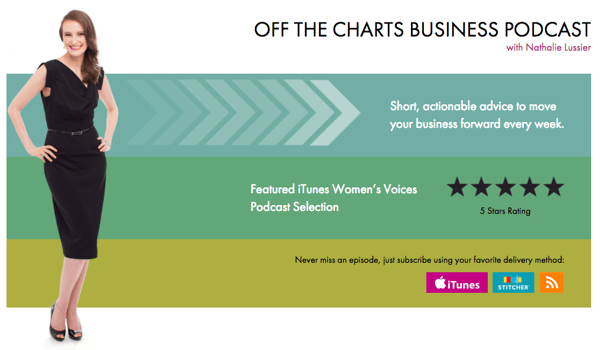
off the charts business podcast

Source: Nathalie Lussier Media

Digital strategist and entrepreneur Nathalie Lussier’s podcast, Off the Charts Business, is packed with short, actionable advice to move your business forward. In iTunes, it’s listed under a section for “Inspiring Women’s Voices”, thanks in part to Lussier’s interviews with women entrepreneurs and business experts across the globe. The guests provide a diverse range of perspectives on professional success, management, and work-life balance.

In one episode, Australian coach Leonie Dawson -- who runs the Shining Biz + Life Academy -- discussed the importance of documenting goals for the purpose of business planning. That’s huge -- 82% small business owners say that envisioning their goals have helped to actually accomplish them.

“The more that you’re in tune with where you’re going,” she said, “you will very, very naturally see what it is that you need to start doing and what you need to stop doing, in order to make sure that your business and life goals come true.”

Airing bi-weekly, Lussier’s episodes discuss what it takes to run a growing business -- like productivity skills and the right mindset. This thought leader provides loads of inspirational and actionable advice on email marketing, digital product development, website creation, business management, and more of the best business resources.

5) For freelance development: Daniel DiPiazza

Rich20Something podcast

Source: Daniel DiPiazza

Rich20Something host Daniel DiPiazza is a self-taught millennial entrepreneur. DiPiazza is an advocate for being your own boss, and takes a friendly approach to professional self-discovery, freelancing, leadership, and business organization. Freelance advice is a hot space to be in, too -- the rise of the gig economy seems to have inspired a new generation of side-hustlers and aspiring “solopreneurs.” But it can be scary to get started, which might be why DiPiazza welcomed guest Mark Dhamma, a performance coach for entrepreneurs, to talk about facing one’s fears.

DiPiazza’s podcast has yet to settle into a set schedule, but there are typically four to five episodes each month. You can access them via YouTube or iTunes.

6) For faith and communication: Andy Stanley

Andy Stanley Leadership podcast

Source: Stitcher

The Andy Stanley Leadership Podcast takes a faith-infused approach to leadership, efficiency, communication, and lifestyle. An author of dozens of books, Stanley is a big believer in character, clarity, courage, and competency as the pillars of leadership.

In one episode, guest Glen Jackson -- co-founder of brand communications agency Jackson Spalding -- explains the first three of his “seven pillars of preeminence.” To build a truly exceptional organization, Jackson believes, leaders must build trust, strong relationships, and a focused marketing communications program. And, he discusses how you know when you’ve achieved preeminence.

Stanley is a pastor, communicator, author, and founder of the North Point Ministries in Alpharetta, Georgia. His podcast has a lot to offer business professionals of all backgrounds -- episodes are posted on a monthly basis.

7) For team building and success stories: Jesse Lahey

Engaging Leader podcast

Source: Engaging Leader

The Engaging Leader podcast, hosted by author and HR consultant Jesse Lahey, is dedicated to discourse about leadership and communication principles. Knowing that meetings are a point of contention -- 33.4% of their participants say it's not a productive use of time -- consultant Karin Hurt came on the show to talk about “How to Lead Meetings That Get Results (and That People Want to Attend).” Her advice was to overtly state the objective of every meeting, and to invite only the people who truly must attend if those objectives are to be met.   

Lahey conveys key business lessons through storytelling and humor, often sharing engaging stories as springboards for giving over valuable advice about work-life balance, teamwork, and leadership development. Episodes are published on the 1st and 15th of each month and last 30 minutes.

8) For book-driven business insights: Jeff Brown

Read to Lead Podcast

Source: Read to Lead Podcast

Hosted by seasoned broadcaster Jeff Brown, each Read to Lead episode examines a different business book. Brown drills down to talk about each book’s take on personal development, leadership, business, productivity, marketing, and entrepreneurship.

At one point, Brown was joined by management coach and author Michael Bungay Stanier to discuss his latest book, The Coaching Habit. Among other topics, Stanier explained what he sees as the three most common and potent self-perpetuating obstacles to professional achievement: overdependence, overwhelm, and disconnect.

This podcast could be especially valuable If you love reading, but don’t have the time to pick up every business book you’re interested in. It’s a great opportunity to get an inside look. Although Brown doesn’t air on a set schedule, you can access all of his episodes on iTunes and his website.

9) For learning to lead and live intentionally: Michael Hyatt

This is your life Podcast

Source: Michael Hyatt

Publishing executive Michael Hyatt co-hosts his weekly This Is Your Life podcast with emcee-for-hire Michele Cushatt. Some recent episodes have covered things like charisma, handling critics, software recommendations, and getting the most out of vacations.

Hyatt and Cushatt once took on topic of “the cult of busy” in the “6 Ways to Reclaim Your Free Time” episode. With some sobering tough love, they made a compelling argument for individuals to take responsibility for their own busyness levels. After all, 61% of U.S. professionals say they’re too busy to do the things they want, and that’s a problem. That means smart time management requires sometimes saying no.

“It may be that you have a fear of missing an important opportunity. It may be that you have a fear of disappointing other people. It may be that you have some other kind of fear

that keeps you stuck in this area,” said Hyatt, “but the real problem is us.”

Hyatt strives to help each of his listeners “live with more passion, work with greater focus, and lead with extraordinary influence.” With recurring themes including the importance of life planning, writing, healthy lifestyle, and influence, Hyatt’s podcast delivers well-rounded inspiration. New episodes go up every Monday morning on his website.

10) For growing and marketing brass: HubSpot

The Growth Show Podcast

Source: Stitcher

Hosted by HubSpot’s VP of Marketing Meghan Keaney Anderson and CMO Kipp Bodnar, The Growth Show is an exploration of all things relating to business growth. Anderson and Bodnar take turns at the helm, welcoming expert guests to talk about growth: organizational, cultural, conceptual, and team.

In one episode, Bodnar welcomed Candor, Inc.’s Kim Scott, whose “radical candor” framework has transformed the way companies like Apple, Google, Twitter, and Dropbox handle team management. Encouraging us all to unlearn the old adage, “If you don’t have anything nice to say, don’t say anything at all,” Scott championed an approach to feedback whereby managers maximize their abilities to “challenge directly” and “care personally.” The most effective and revered managers, Scott said, are invested in their team relationships enough to give honest feedback, even when it’s negative.

Can’t Hurt to Download

If you’re looking for an easy way to learn about taking your career to new heights, management podcasts are a great solution. Always available with new and engaging insights, this could be the connection between you, greater skills, and stronger leadership. Plus, they’re a great way to add a productive edge to what might otherwise be “time-sucks,” like your commute, cleaning, or getting from point A to B.

What are your favorite management podcasts? Let us know in the comments.

free guide to podcasting


from HubSpot Marketing Blog http://blog.hubspot.com/marketing/best-podcasts-for-management
Via http://blog.hubspot.com/marketing/best-podcasts-for-management

5 Questions Credit Unions Should Ask to Improve their Marketing

yingyangquestion.jpg

Clarity is the key to efficient, productive marketing. Unfocused efforts keep your team busy, but they're not going to get you the new membership or product enrollment numbers your credit union is looking for.

Your team works hard. Ask yourself these five questions to ensure they're also working smart and targeting their efforts on activities that can get more from your most fertile opportunities with both your prospects and current member communities.

1) What's My Definition of a Lead?

Many people visit your website for a lot of reasons. Some of them may even be interested in your services and products. That still doesn't mean they're a good lead for your credit union. Maybe they don't live within your target area or don't meet a minimum income amount.

A "good" lead is someone who meets your persona criteria, and who's also shown readiness to move into the decision phase. In other words, they're getting ready to put their money down somewhere. Once ready, it's time to pass the lead on to business development. 

But your business dev team doesn't have the resources to invest its efforts on prospects who aren't yet leads. For the sake of interdepartmental harmony, team up and define what behaviors and criteria tell you both when someone is ready and able to be a good fit for your credit union.

2) Where are the Conversion Points on my Website that Gather Information? 

Conversion points on your website are opportunities for you to gather intel so you can market to prospects and leads more effectively. 

Visitors are in all different stages of their buyer journey Some want to learn more, but aren't yet ready to join. (And every visitor may not be your target persona.) You can't just give them one option such as the "Join Now" button. That's because not all of them are ready to sign up for your services. 

Have some premium content offers — such as a selection guide on how to clarify what credit card perks will give them the best return based on their habits and financial needs. The forms used for premium offers can ask for a more "personal" information — e.g. how many years away from retirement they are, or how many credit cards they currently hold. We call this progressive profiling and it will let you collect an on-going stream of valuable intel without scaring away your prospects.

You can also collect phone numbers with a "request a call" form for prospects ready to become leads. 

If you don't have multiple conversion points where visitors with different needs and in different stages can provide you with information, you're not learning nearly enough about your prospects.

3) Do I Have an Email Program for Prospects that Offers More than Just Financial Services?

If all you're doing with your email marketing is selling, you're ignoring what makes inbound marketing so effective. Educate. Entertain. Use your content to create a relationship and position your credit union as a trusted authority.

When you build that foundation, the selling part comes much easier. Send emails sharing blog posts or reports that answer important financial questions. Send emails that update people on relevant, important news that impacts them. First instance, perhaps there's been recent data breach at another financial institution in the news. You could use that as an opportunity to send contacts and leads in your database an email with five tips on protecting their identity and reassure them of the tight security practices in your own organization.

A good baseline ratio is 4:1. For every five emails you send, only one should be about selling.

4) Do I Have a Retention Plan that Offers More than Just Product/service Updates?

An inbound marketer's work isn't done once someone becomes a member. Your credit union has lifetime value goals for its members. After all, you want to keep churn rates as low as you can. Getting new members is more expensive than growing the value of a current member. 

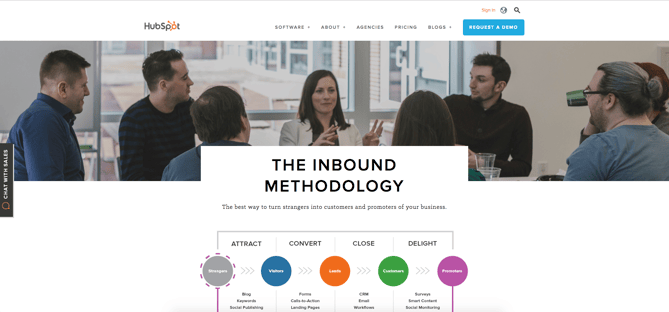
This is the "Delight phase" of  the inbound methodology. Just as you want to educate and entertain your prospects and leads far more often than you sell to them, take the same approach with your current members.

Continue to educate current members about relevant financial concerns, independent of promoting any product or service. You can blur the lines a bit here by sending content that helps them better use the product or service they already have with you. You're not upselling here. You're educating active and dormant members to make sure they're getting the most from what they already have.

You can also offer members other opportunities to benefit from their membership that don't involve buying a new product or service. Do you have member events? Send a survey asking for their feedback on the credit union or about their current concerns and priorities in their financial planning. Run a promotion to get them to share their story of how they're using their membership and get some great user-generated content.

5) Do I have a System to Measure Prospect Generation and Prospect to Lead Rates?

The beauty of digital marketing is all the actionable data you can use to refine your efforts and improve your marketing ROI. The basic metrics you need to know for each campaign are how many prospects were generated and what percentage of these prospects became leads and how many of those because members. If you can't quantify where you're generating quality leads and how many you're generating, you can't set targets to direct your efforts productively. 

To know where your prospects and leads are coming from, you need a back-end attribution system. If you run a Facebook and Instagram campaign promoting your premium offer, your system should be able to tell you who downloaded the report after being directed from Facebook and who downloaded it via organic traffic to your website. That's valuable intel on how (or whether) to use Facebook and/or Instagram. This is the prospect part.

You still want to know how many of the prospects who downloaded this report continued to take action that reflected growing interest and demographics that qualified them as a lead.  When you have a back-end system that tracks this information, you might find out that your Facebook and Instagram ads produced comparable numbers of prospects, but the Facebook prospects converted to leads at a much higher rate.
You need this kind of intel so your team isn't relegated to operating under the outdated cliché of not knowing which half of your marketing works and which half doesn't. 

Start with these five questions to make sure your team operates under a better cliché: working smarter, not harder. Keep their energies focused on the activities that provide bottom line return. And watch the results roll in!

A Guide to Growing and Engaging Your Member Base


from HubSpot Marketing Blog http://blog.hubspot.com/marketing/5-questions-credit-unions-should-ask-to-improve-their-marketing
Via http://blog.hubspot.com/marketing/5-questions-credit-unions-should-ask-to-improve-their-marketing

The Top 10 Conversion Lessons One Agency Learned After Critiquing 100+ Websites

Lessons from Website Critiques.jpg

When it comes to website design, creating a page that is visually appealing, aligned with your brand, and optimized for lead generation is no easy task. After all, there are a lot of mistakes you can make in the process.

That's why -- for almost two years now -- my team here at IMPACT Branding & Design has been hosting a monthly live website critique called Website Throwdown. Our goal is to help people recognize and correct some of those mistakes, while educating other viewers in the process.

The best part? We critics happen to learn a thing or two about marketing, UX design, and conversion rate optimization (CRO) in the process, too. It's a win-win. So in the spirit of education for all, I've recapped the top 10 CRO lessons IMPACT has learned after critiquing over 100+ websites below.

P.S. - Want your website critiqued in person at INBOUND 2016? We're hosting a live throwdown in Club INBOUND with the help of special guest like HubSpot’s Luke Summerfield and The Sales Lion’s Marcus Sheridan and George B. Register for INBOUND and then reserve your throwdown slot here.

The Top 10 CRO Lessons One Agency Learned After Critiquing 100+ Websites

Lesson #1: Too many brands are hiding social proof.

So you’ve worked with some highly respected brands and they couldn’t love you more -- why aren’t you screaming about it from the rooftops?

After critiquing over 100 websites, we found that a surprising majority of brands hide their social proof far down on their homepage or worse -- isolate it to a never-seen page in their navigation.

Nothing speaks more highly of your work than word-of-mouth and by hiding this powerful information where visitors are unlikely to look, you can risk it going completely unnoticed.

To get the most out of social proof, incorporate elements of it into your homepage design where your visitor’s attention is at its highest. (A heatmap from Hotjar can help you determine where this is exactly.) Doing this will help you make a strong impression and immediately establish credibility in the eye of the reader.

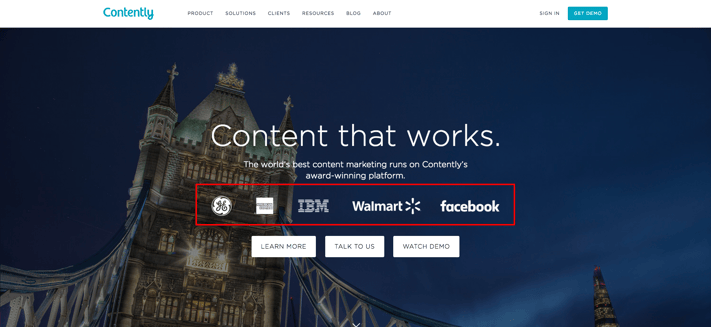
Take a look at Contently, for example. On its homepage, the content company shows off who has used its platform before even asking you to watch a demo or learn more. Leading with this social proof builds trust and makes the visitor think, “if it worked for them, it’ll work for me.”

CRO-lessons-1-social-proof-contently.png

Elements of social proof you can consider incorporating into your homepage include:

  • Partner/Client logos
  • Testimonials
  • Awards
  • Certifications
  • Reviews
  • Affiliations
  • Social Followings

Lesson #2: Real photography is underappreciated.

"Stock photos of people should never be used to represent your customers or your employees. Lose them,” commented David Meerman Scott during one of our live critiques. (He'll be critiquing websites with us live at INBOUND, too.)

Now, you're probably saying, "but, but sometimes I need to use stock photos." And I get that -- especially when you don't have the budget for a photographer, or you're in a time crunch. But with so many organizations using generic stock photos prominently on their websites, investing in real photography or custom graphics is an easy way for your company to establish credibility and stand out.

Using authentic, real photos of your team or office can help frame your business in a more genuine, relatable light. This can make visitors feel like they actually know you, and in turn, make them more comfortable doing business with you. 

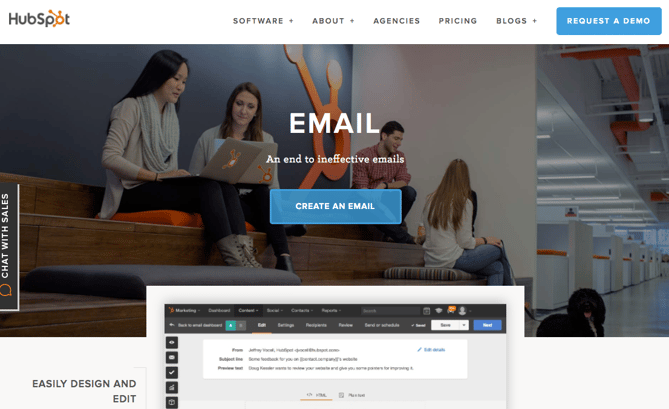
HubSpot does a great job with this, capitalizing on their real employees, rather than stock models on every page of their site.

Email Page HubSpot.png

CRO-lessons-hubspot2.png

Moral of the story? If you have to use stock photos, choose them wisely -- avoid results on the first page, look for unique shots, and steer clear of anything overly cheesy. (If you need help, here's a list of quality stock photo sites to get you started.)

Lesson #3: Bring differentiation to the forefront.

If people can’t identify your company’s unique value within a few seconds of being on your homepage, chances are you’ve already lost their business.

Attention spans today are low. When visitors first arrive on your site, you need to tell them exactly what makes you different and why they should stick around to learn more.

One of the most effective ways to accomplish this is with a well-thought out and prominently placed value proposition that explains:

  • What you do
  • Who you do it for
  • How you do it differently from your competition

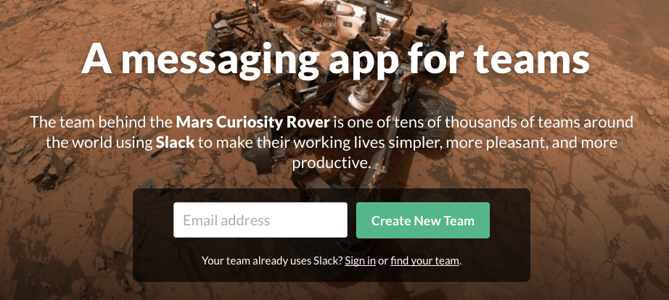
In this article, I discussed how Slack nailed its value prop on its homepage. Just look at this breakdown:

  • What does it do? It's a messaging app.
  • Who is it for? Teams.
  • How does it do it differently from the competition? It makes working lives "simpler, more pleasant, and more productive." (Plus, the team behind the Mars Curiosity Rover uses it ... and that's just awesome.)

Slack Messaging App Value Prop.png

Lesson #4: Imagery and messaging need to align.

Your imagery and text should send the same message to -- and elicit the same emotions from -- your visitors. For example, if your value proposition positions your company as the ideal solution for metropolitan corporations, don’t use photos of small business owners or a local business plaza.

Using misaligned imagery like this can be confusing and send your visitors mixed messages -- and nothing manages to cause conversion friction quite like confusion.

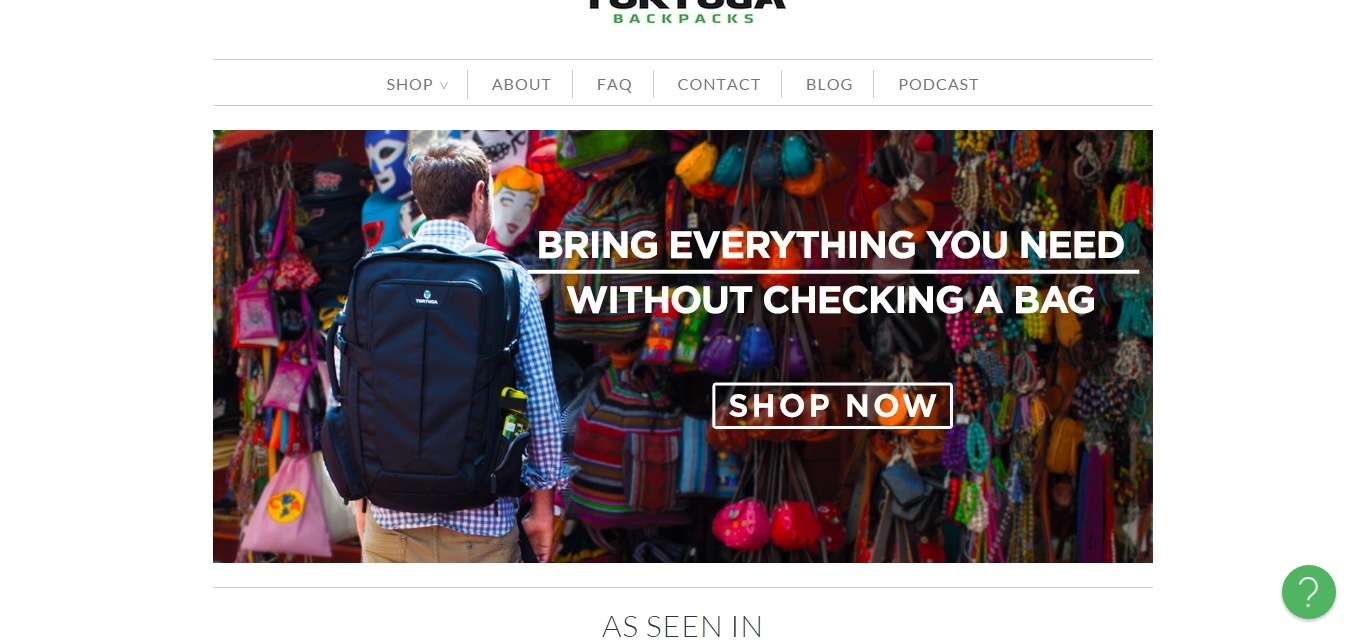
Tortuga Backpacks does a commendable job with this, showing a customer wearing its product in a colorful market. The image evokes thoughts of travel, while the copy addresses a common travel pain point: checking a bag.

CRO-lessons-alignment-tortuga.jpg

Lesson #5: Conversion paths must be clear and direct.

As obvious as it sounds, another lesson we learned on Website Throwdown is that one of the best ways to increase conversions is by making your path to conversion as clear and direct as possible.

Visitors can make the decision to convert or purchase at any time, and when they do, brands like yours need to make sure that the ability to do so is easily accessible.

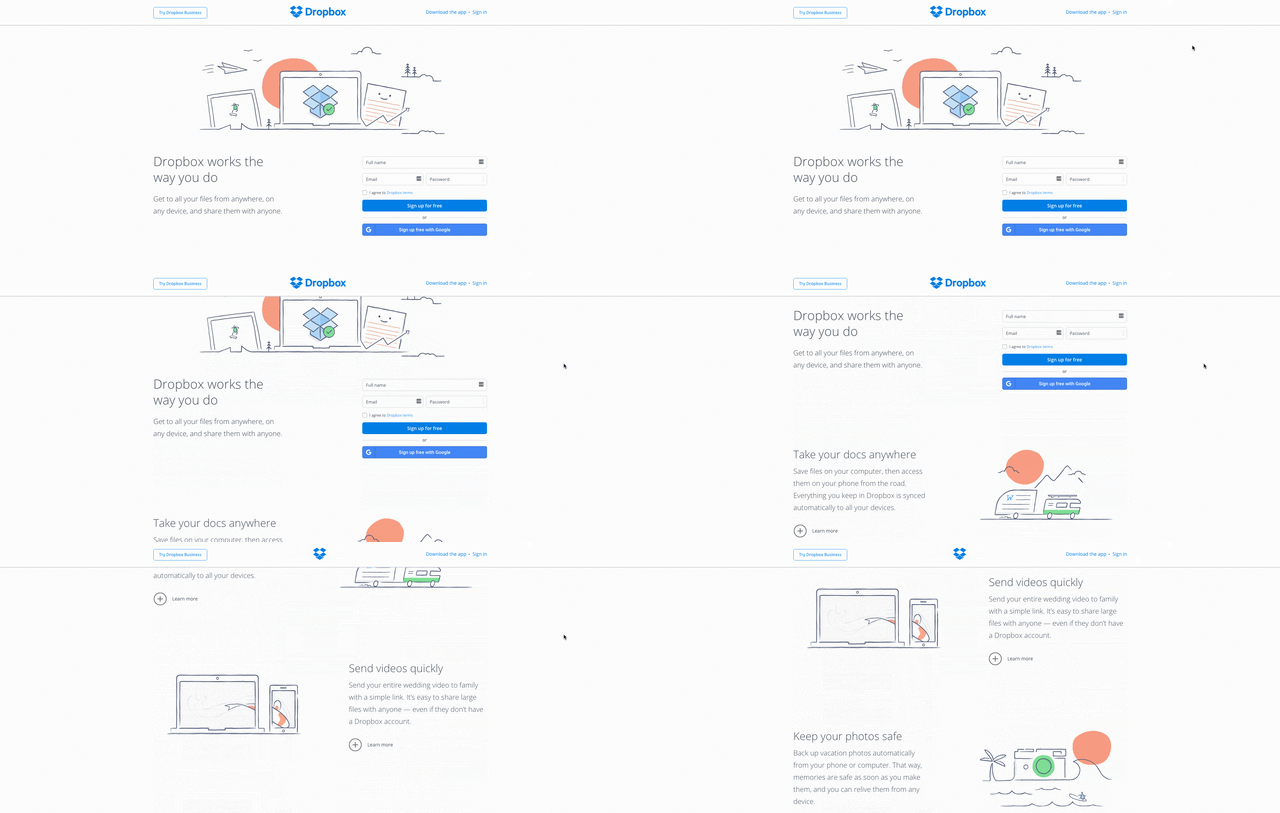
One company that’s truly mastered this is Dropbox. With a “Try Dropbox Business” call-to-action in its sticky hello bar, the cloud storage company ensures that no matter how far you scroll down the homepage, you have a conversion point within reach when you need it.

CRO-lessons-5-conversion-dropbox.gif

Lesson #6: Avoid carousels and sliders.

If you're considering a slide or website carousel, click here.

No but seriously, whether it’s HubSpot’s Austin Knight, CMO Kipp Bodnar, or Copyhackers Joanna Wiebe, the sentiments have been the same on Website Throwdown: carousels aka “sliders” have got to go.

Not only do these once-popular homepage features hide messages and take control away from the user, but they can also overwhelm the user, bombarding them with too many options at one time. 

When it comes to your website, each page should have one main message and one main goal for the visitor. And pulling them in different directions with multiple propositions and CTAs in a carousel will only lead to analysis paralysis -- and ultimately even fewer conversions.

Lesson #7: Video is a huge advantage.

In Crayon's 2015 State of Video report, the company found that video appears in 70% of the top 100 search results, while websites that incorporate it tend to see two more minutes of on-screen time than those that don’t.

Simply put, this means that video is powerful.

It grabs your visitor’s attention in a way that text alone cannot and adds more dimension to your brand. Video allows you to put a face and voice to your brand, making it more human. It also allows you to communicate more information about your product, brand, or culture in a shorter amount of time.

The quicker you engage and explain your value to website visitors, the more likely they are to stick around and take action. 

Need inspiration? Check out this roundup of fabulous explainer videos.

Lesson #8: Don’t force visitors to think.

Like I mentioned in lesson #6, giving your visitors too much information can lead to inaction -- that’s because you’re forcing them to think.

As Hotjar's Tara Robertson said on last month’s Website Throwdown, “the last thing you want someone to do when they land on your homepage is think.” People don’t like to think unnecessarily and quite frankly, it can only lead to over-thinking.

As a brand, you don’t want to burden people with the task of interpreting multiple messages or options to determine their next step. Rather, you want to focus on one action that you want taken and tell them exactly how to do it with clear copy and calls-to-action.

Streamlining your messaging and telling visitors what they should be doing next reduces confusion and friction, making it more likely that people will convert. 

Lesson #9: Clear goes further than clever.

Now, I love cheeky copy as much as the next girl, but when it comes to conversion rate optimization, clarity takes precedence.

Whether it’s in your headlines, navigation, or button text, always strive to be clear and concise with your copy to avoid misunderstandings and lost opportunities.

Any language you use on your website must resonate with and speak directly to your buyer persona in order to be effective and drive action. For instance, while labeling your product page “our masterpieces” may seem fun and quirky, if this is not a phrase that will be immediately understood by your persona and drive them to clickthrough, it shouldn’t be used.

Need help saying more with less? Try these six creative exercises for writing more concisely.

Lesson #10: Be human.

At the end of the day, even in a cold, cyber world, people want to interact with other human beings. They want to do business with those they can relate to -- individuals who understand their pain points and concerns and will advocate for them.

In this effort, use your website to humanize your brand.

I can’t tell you how many companies we’ve encountered that talk about team members and collaboration on their websites, but never show a single face or name. This doesn’t do much for their credibility.

To avoid coming off cold, share real photos of your team members and show some personality. Include bios of your key team members, or even shoot a short video introducing them to your website visitors. Showing an authentic, personable side to your company can make visitors feel more comfortable doing business with you and yes, you guessed it, converting.

Is your website falling victim to any of the issues I pointed out above? Don't forget to come meet the rest of the IMPACT crew at INBOUND 2016 for a live website critique. See you there!

free webinar: conversion rate optimization

from HubSpot Marketing Blog http://blog.hubspot.com/marketing/conversion-lessons-critiquing-100-websites
Via http://blog.hubspot.com/marketing/conversion-lessons-critiquing-100-websites

Why Organizational Design is the Key to Authentic Client Branding

Ding, Ding, Ding. The bell rings and the fighters come out of their corners.

Out the blue corner, with a market cap of $100 billion, steps forward the Fortune 50. Fortune’s been around for a decade, and while they aren’t the fastest puncher, they’ve weathered many a tough round and have learned how to last.

Out of the red corner charges the lighter, faster startup. Startup’s new, but they attack forward, confident that their approach will throw Fortune completely out of rhythm. And it just might. That or the disruptor’s meaningless blows will bounce right off Fortune, and the behemoth will pivot slightly and with one punch leave the startup laying on the mat.

While it obviously isn’t that simple, this is commonly how agencies seem to frame the battle between disruptors and incumbents. Whoever’s corner you are in, you completely change your approach.

And there is admittedly a good reason for this, particularly when it comes to branding projects. Startups speed through product and innovation cycles, hell bent on failing early and often so they can get a product in front of users. Maybe, just maybe, they create a minimum viable brand. But what constitutes viable? How often does a MVB truly represent the essence of a brand, what it believes in, and what distinguishes it from the competitors?

For Fortune 50s, their leaders know digital disruptors are the cool kids on the block, but in many cases their product innovation remains bogged down, forcing them to acquire the startups that succeed (See Unilever and Walmart). Internal brand change happens at the same lagging pace -- organizational politics and clashing stakeholders keep brand development from moving fast enough to keep up with today’s evolving digital-first consumer.

But I want to posit that there lies a middle ground that agency partners must focus on instead of the nature of their competition.

Startups must learn to be more thorough in their branding, but large, mature organizations must learn to be agile (with a lowercase a). We must combine the best of both ways of working and redefine what it means to be a minimum viable brand if we want to meet the expectations of consumers that now care less about logos, and more about what a brand represents.

We must consider an approach that forces the disruptor to discover what they stand for, and that gives the incumbent a rally cry to unify stakeholders and accelerate their brand development.

We must design organizations of all sizes from the inside out to brand in the "post-digital age."

Agencies Can't Overlook Organizational Design

When you experience a brand, you see it, touch it, hear it, and ultimately feel it -- all the stories, touchpoints, and communications add up to one comprehensive experience. Fundamentally, branding is about differentiating yourself from the competition with this singular experience.

If a product is intended to make consumers feel like they go faster, how does everything in the copy communicate speed? What are the top 50 adjectives that people are currently using to communicate the word "faster"? How do people interact with their digital platforms when they are trying to accomplish tasks quickly?

It is more important than ever that this articulated point of view dictate every action that an organization takes, internally and externally. A brand is really just a collection of values. Consumers purchase, interact, and evangelize brands whose values intersect with their own. They are proud to wear a shirt with their favorite brand displayed across the front because they want others to know who they are and what they believe in.

Insights and market factors certainly shape how a brand strategy comes to life, but organizational design must be the foundation from which a brand is built. If the values of an organization don't square with the values of their market-facing messages, consumers will tune out. Your client will be labeled "inauthentic" and your agency’s marketing efforts will feel fraudulent.

To design the future of your client’s business, start with their organization. What does it stand for? It's not just their product. It's not just their service. It's not just their experience. It's everything.

In his book, Primal Branding, Patrick Hanlon, CEO and Founder of Thinktopia, explored what separates popular brands from the rest and discovered what he calls the "primal code” -- seven assets that construct the belief systems behind the world’s most beloved brands.

The first part of the code is the creation story, which I believe to be integral for articulating the true purpose behind any organization. Every brand or business started because the founder or founders wanted to bring a vision to life. Codify this vision and let it define how you articulate your client’s brand.

Align Internal Culture with External Branding

The customer service at Disney Parks is legendary. The experience that "cast members" provide sends children and adults (bigger children) back year after year. A big reason for this is that every single Disney employee starts their on-the-job training with a study of Walt Disney’s original vision to create the “happiest place on earth.” Job responsibilities and day-to-day minutiae take a backseat to the creation story that will inform an employee’s every on-the-job action.

LEGO lost $300 Million in 2003, the year before Jorgen Vig Knudstorp took over as CEO. Ancillary businesses had taken the toy company far from its brick roots but the company’s fortunes quickly turned when Knutstorp embraced its simple founding vision: to create building educational toys.

He often quotes a T.S. Eliot poem throughout the company, "We shall not cease from exploration / And the end of all our exploring / Will be to arrive where we started / And know the place for the first time." In the decade since, Lego has posted sales growth each year, including a double-digit growth in 2015.

By aligning your client’s people, processes, and platforms with its original purpose, you are able to give their employees and partners commander’s intent -- a military term that describes what the commander sees as the end state of a successful mission. By showing what success looks like, subordinates can improvise under duress, as long as the end result is in line with the commander’s intent.

Meaning, a Disney employee or vendor can ask themselves, "Am I making someone happy?" A LEGO product or experience designer is empowered to ensure their work is true to the brand’s brick beginnings.

One might say, "well that would never scale. I could never do that at Walmart." But you know what? Consumers prove time and time again that they are willing to spend more on a product for a better experience.

Better brand experiences start with better organizations. Organizations with internal cultures and external market-facing brands aligned to their creation story. Organizations that understand the singular reason they exist, and how that purpose can drive every single interaction that consumers have with a company, whether they are using a product or service, interacting with digital content, or messaging customer service.

Whether your client is a startup, or a Fortune 50, their organization must be designed from the inside out if it wants to stand a chance in the ring. Consumers don’t care whether a brand is the incumbent or a disruptor, they care about whether a brand provides a cohesive experience that aligns with the values they expect.

How Design From the Inside-Out for Your Clients

Great brands are built on great stories, so start by uncovering a compelling, sticky creation story. Finding a compelling brand story to extend throughout your client's organizational design doesn't have to be a start-from-scratch process. Interview your client early on in the relationship about their origin story, their values, and what they like about their current branding. 

As Simon Sinek says, "people don't buy what you do, they buy why you do it." Our minds think in stories and narratives, and so should your branding. Sculpting a sticky brand story begins with uncovering why your client does what they do, and how their unique why sets them apart from their competition.

Next, define the outcomes that drive success for your client. Not just for marketing engagement, but for their company as a whole. Anything your agency delivers must help the client reach that broader outcome. Design artifacts that articulate this vision so your client can share it with every employee, partner, or vendor. They'll thank you when quality of work improves across the board. The last thing you want is your client getting buyer’s remorse.

Once your agency finds the through-line that starts with the why and extends to the customer, you'll be able to design a brand story that defines your client's internal organization and public-facing branding.

client-intake-download


from HubSpot Marketing Blog http://blog.hubspot.com/marketing/organizational-design-client-branding
Via http://blog.hubspot.com/marketing/organizational-design-client-branding